RevOps Lead Scoring Playbook for High-Growth Teams
Set up lead scoring in HubSpot and Salesforce the right way. Criteria, setup steps, score decay, and best practices to prioritize quality leads and boost conversion.


Table of contents

This playbook addresses the fundamental principles of lead scoring and grading. It provides resources on determining score criteria and how to set up lead scoring and grading in HubSpot and a rudimentary method in Salesforce. It does not go in depth about configuring Einstein Lead Scoring.
1. Introduction to the Project
Description: A lead score is a numerical value stored on Lead/Contact or Account/Company objects indicating a prospect's likelihood to become a customer, based on engagement (actions like email opens or page views). A lead grade is a letter rating (typically A-F) specifically for fit, based on demographics, firmographics, technographics, etc, assessing how well the prospect aligns with your ideal customer profile.
The lead score quantifies behavioral intent, showing how engaged they are with your content or reps. A lead grade shows how good of a fit they are for your product. A combination score can weigh both factors, typically displayed as both scores in one field (e.g. A95, C22, or D80).
Problems that this solves:
- Sales teams wasting time on low-quality leads.
- Lack of insight into which marketing efforts drive high-quality leads; for marketing resource allocation.
- Poor MQL-to-SQL conversion rates and stagnant pipeline growth as sales accepts and focuses on leads of varying quality.
Definition of success: Achieved when sales efficiently prioritizes high-potential leads, resulting in higher MQL-to-SQL rates; marketing refines strategies and budget allocation based on this data, boosting pipeline; and overall win rates improve through better-qualified opportunities. After optimizing the lead score, you should find that most highly-scored leads move to close won and most low-scored leads are lost or disqualified.
2. When to Implement?
States that may trigger the project (pain points):
- Sales reps overwhelmed by mixed-quality leads.
- Marketing unsure of which content or channels are driving the most bookings.
- Low engagement from handed-off leads.
- Sales and marketing mis-aligned about what should be considered a high-quality lead or sales not trusting the leads that marketing sends over.
- Declining or stagnant conversion rates.
- Teams seeking to automate prioritization beyond manual reviews.
When is the right time to implement this project (prerequisites):
- Reliable behavioral data tracking (e.g., email opens, website visits) is active through Einstein Activity Capture in Salesforce and/or the HubSpot Tracking Pixel and HubSpot Gmail/Outlook plugins.
- ICP and buyer personas are defined and can be tracked through specific fields.
- Cross-team buy-in from sales and marketing for criteria input and ongoing feedback.
3. KPIs
MQL-to-SQL Conversion Rate
Scoring highlights hot leads for the Sales reps, streamlining qualification and increasing conversion rates as they spend most of their time and energy on high-quality prospects.
Pipeline Generation
As marketing recognizes which channels bring in the highest quality leads, they can allocate spend away from low-quality areas to increase the amount of leads from quality sources.
Win Rate
Higher-quality SQLs from refined criteria lead to more closed-won deals.
Sales Rep Capacity
Prioritization reduces time spent sifting through lead lists and working on low-potential leads, allowing reps to handle more volume.
4. Roles Involved
Marketing Ops
Define score types, criteria, and decays; collect feedback and iterate.
Marketing Leadership
Review results to refine content and targeting (e.g., prioritize high-fit segments via grades). Reallocates marketing spend as high-quality sources are identified. Works with Sales leadership to determine and refine the thresholds for Hot/Warm/Cold.
Sales Reps
Use scores/grades for prioritization; provide feedback on the accuracy of the score.
Sales Leadership
Reviews the scores of the leads being worked by the reps to ensure that reps are using their time effectively. Review the scores of leads related to closed won and lost opportunities to provide feedback to marketing on how accurate the lead score is at forecasting the quality of the lead.
5. Tools/Technologies
Lead Scoring Template Spreadsheet
Developed by HubSpot, this is a framework to define and calculate scores based on demographics, firmographics, and behaviors. Clone this template to customize and send to the client.
HubSpot Marketing Hub Pro/Enterprise
Stores records and calculates scoring via built-in app for behaviors and attributes.
Marketing Hub Enterprise and Pro both have access to this feature, but Marketing Hub Enterprise has access to AI Lead Scoring.
HubSpot Tracking Pixel
Captures website interactions for behavioral scoring.
HubSpot Gmail/Outlook Plugin
Logs email engagements (opens, clicks, replies) to inform behavioral scores.
Salesforce
Custom fields and flows for manual scoring or storing a score passed from HubSpot. Supports Einstein for AI-driven lead scoring and sales rep activity capture.
Salesforce Einstein Lead Scoring
Automatically generates scores using AI on conversion patterns and custom fields.
Einstein Activity Capture
Records sales interactions for additional scoring.
6. Questions before Implementation
Need to Know Before Starting the Project
- Do you have any pre-conceived ideas about lead scoring? Have you used lead scoring at a previous company?
- What is the purpose of the lead score (e.g., measuring engagement, setting sales thresholds, or providing additional info for sales)?
- What type of score is needed (e.g., behavioral/engagement, fit/grade, combined, or deal-based)?
- Which objects will the score apply to (e.g., contacts, companies, deals)?
- What explicit data points (e.g., job title, company size, industry) indicate a good fit for your ICP?
- What behavioral signals show interest (e.g., email opens, form submissions, pricing page views)?
- What actions or properties should be included in the score criteria (e.g., page visits, meetings)?
- How should different criteria be weighted to reflect their importance in qualifying leads?
- What data is available in the CRM to build effective score criteria, and how current/accurate is it?
- What integrations (e.g., email tools, websites) need to feed data into scoring?
- How will different teams (e.g., sales, marketing) use the scores, and do their goals align?
- Are there clear qualification criteria that could be handled by workflows instead of scoring?
Nice to Know
- What is the desired max score (e.g., 100 or 500), and should custom limits be set?
- Do you need negative scoring for actions like unsubscribes or inactivity?
- Which negative behaviors should deduct points (e.g., unsubscribe, no activity for 30 days)?
- Should scores decay over time (e.g., reduce points for old engagements)?
- Will scoring apply the same to all contacts/leads or specific segments (e.g., by industry, source, buyer persona)?
- Based on past closed-won deals, which industries, job roles, or engagements correlate with higher conversions?
- What professional information or demographics have leads submitted that correlate with higher conversion rates?
- How have leads engaged with your website/brand, and does this predict conversion?
- What behaviors (e.g., downloading offers, opening emails) indicate a lead is more likely to become a customer?
- Who owns ongoing optimization, and how often (e.g., quarterly reviews)?
- How will scores be monitored and updated to ensure they remain relevant?
- How often will we consult sales teams for feedback on predicted vs. actual lead quality?
Related but Not Always Relevant
- Are there custom traits (e.g., certifications, social media follows) to include?
- Are there regional or cultural differences that require separate scores?
- What testing scenarios are needed in sandbox (e.g., simulate high-score conversions)?
- Is there a rollout plan, including training for reps and notifications for new high scores?
- Do we have access to AI tools for predictive lead scoring (e.g., HubSpot AI for Enterprise)?
- How will we use AI-generated insights to determine optimal engagement times?
- What CRM features, like time decay or group limits, will we use for adjustments?
- How will we review analytics to monitor conversion rates and refine the model?
- Are there additional applications for scoring properties (e.g., data quality, campaign engagement)?
- Should we create multiple scoring systems for diverse audiences (e.g., new regions, personas)?
- What valuable content from analytics reports helps identify converting leads?
7. Additional Details and Context
HubSpot Help Article: Read this help article if you are going to be setting up lead scoring in HubSpot. Some of the information may be repeated or conflict with what is in this document. Understanding the Lead Scoring Tool
Best practices: Start with behavioral scoring for most impact, adding fit later; once these have been dialed in, you can recommend a combined score, but this may lead to unnecessary complexity if users have not had time to get used to and provide feedback on the behavioral and fit scores.
Use explicit data (e.g., job title, revenue) for fit and implicit (e.g., page views, email clicks) for engagement. Set positive points for high-intent actions (webinar attendance = 20), negative for disengagement (spam complaint = -20).
Regularly optimize by analyzing conversions—review win rates by score bucket and adjust weights (e.g., if webinar attendees convert less than email engagers, lower webinar points).
Test with historical data to validate model accuracy before launch.
Should demo requests increase the lead score? No. We do not recommend including adding MQL triggers to your lead scoring criteria. For example, if submitting a demo request form sends a lead directly to sales, it should not add 100 points to the lead score. One purpose of the lead score is to track all of the auxiliary actions taken by a prospect. If you have a queue of demo request leads and one of them has been active on the website and attending webinars, they should take priority over someone who has only submitted the form.
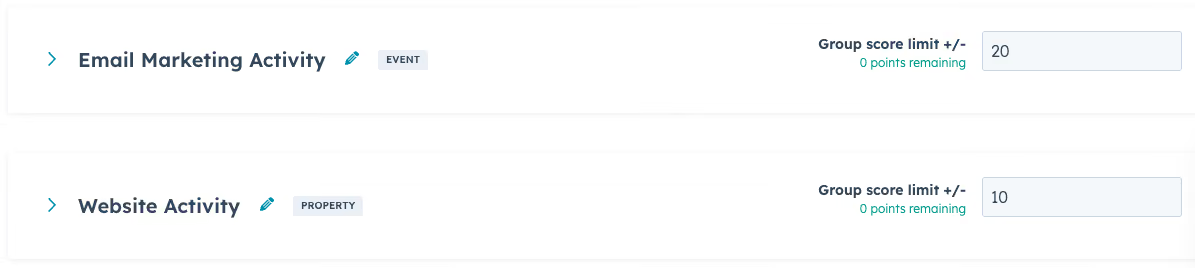
Score categories and ceilings: In HubSpot, you can group score criteria into categories. For example, you could create categories for email marketing, website traffic, events and webinars. Within these categories you can set a maximum score. This prevents a contact from over-indexing on one single action. For example, if a contact opened an email 50 times, it wouldn’t add 5 points for each open, it would stop counting after just a few. That way someone’s score does not jump up to 250 from email interactions alone, which may or may not be that indicative of lead quality.
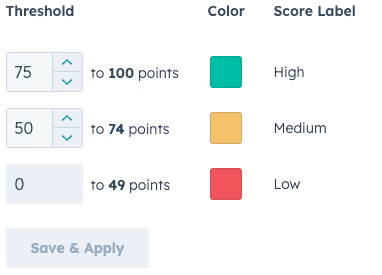
Score thresholds: HubSpot allows you to set thresholds for High, Medium, and Low engagement/fit (you can translate this to Hot/Warm/Cold). If this is something that would add value, you can also bring this into Salesforce or create a formula property to return the same categorization. (HubSpot Help Article)
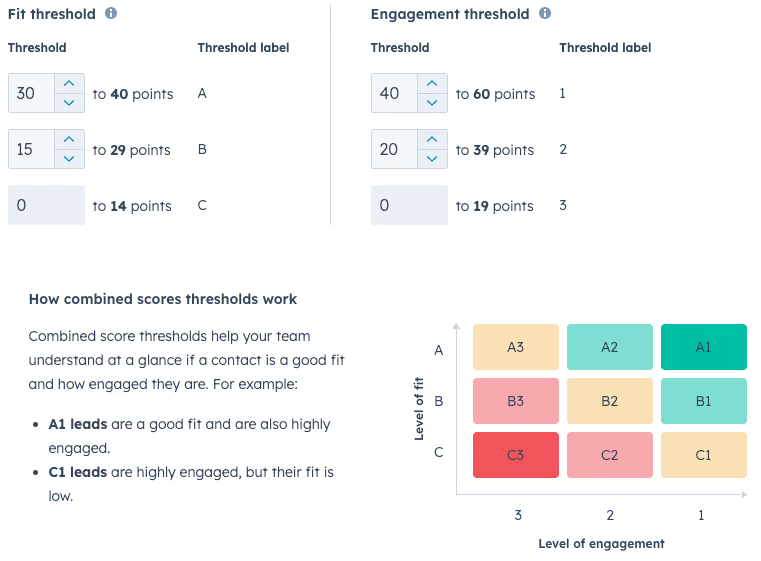
Score Decays: For engagement or combined score event groups, you can turn on score decay, which automatically reduces an individual event's score based on how long ago a scored event occurred. Score decay is independent to each event, follows linear logic, and decayed scores aggregate to the overall score value.
For example, a rule gives 10 points when a specific form is filled out. If this event's decay is set to 50% every month, then one month after the form was filled out, the 10 points from that event will be cut in half and the event now contributes 5 points to the score. The decay is based on the original event score value (i.e. 10 points). In this example, another month later, the form submission contributes 0 points to the score.
Score decay also applies to historical data. For example, if a rule adds 2 points for a CTA click with 100% decay in 3 months, if the CTA click happened 4 months ago, the contact won't get 2 points. (HubSpot Help Article)

HubSpot AI Lead Scoring: This is for Marketing Hub Enterprise customers only. For contact engagement and fit scores, you can create scores using AI. When you create an AI score, your contacts are evaluated to train the AI model and a score is built with recommendations based on the evaluated contacts. A minimum sample size of 50 contacts, containing 25 converted and 25 non-converted, is required to generate a score.
For example, if you set Start: Marketing Qualified Lead, End: Sales Qualified Lead, Timeframe: 30 days, the AI will identify commonalities among contacts who transitioned from Marketing Qualified Lead to Sales Qualified Lead in the past 30 days and generate a score with criteria based on the insights. (HubSpot Help Article)

8. Step by Step
- Get buy-in from marketing and sales leadership and decide how they are going to communicate feedback. Define project success criteria with the client (e.g. lead scoring is live and informing which leads reps are working by the end of this quarter). Discuss a tentative go-live/roll-out plan.
- Align on scope: which score types will be implemented (behavioral, fit/grade, combined).
- Review ICP and buyer personas to map fields for fit/grade (e.g., industry, company size).
- Document proposed criteria using the template spreadsheet (e.g., +15 for C-suite title, +10 for form submit, -15 for unsubscribe); send for client approval.
- HubSpot-Specific Configuration:
This is what the final outcome will look like in HubSpot: HubSpotLeadScoringExample.mov
- Build your score
- Assign points to behaviors that show a contact's engagement with your product offering and readiness for sales. For example, visiting web pages, downloading resources or marketing email opens.
- You can choose the contacts you would like to score.
- Nurture leads or route to sales
- Keep a score for each contact to evaluate their level of interest and engagement. You can use the score to build a more targeted marketing strategy with higher conversion rates.
- Send qualified leads to sales through workflows or lists, to make sure that they focus on the most promising prospects.
- Iterate and improve
- Track and analyze the results of your lead scoring system to improve its effectiveness and get better quality leads.
- This Scribe walkthrough demonstrates exactly where to go to configure everything in the score app.
- Salesforce-Specific Configuration (Step 4b - SFDC Manual):
- Create Lead Score (number field, 0 decimals) and optional Lead Grade (picklist: A-D).
- Diagram flow: Record-triggered on updates to relevant fields (e.g., email open).
- Add decision elements for conditions (e.g., if form submitted, +10).
- Use assignment elements to increment/decrement score or set grade based on fit.
- Debug for multiple signals; test paths with sample records or self-engagement.
- Activate flow.
- Salesforce-Specific Configuration (Step 4c - SFDC Einstein):
- Go to Setup > Einstein Lead Scoring > Get Started.
- Select model fields (e.g., industry, engagement history).
- Enable and review AI insights.
- (Optional) Sync scores to integrated systems.
- If the lead score is being calculated in HubSpot, but sales receives leads in Salesforce, create a lead score field in Salesforce and map the two fields in HubSpot’s Salesforce Connector Application
- Add score/grade fields to page layouts and execute the go-live plan.
- Gather feedback from reps/leadership (e.g., "Why did this high-score lead not qualify? Was the webinar overvalued?").
- Update criteria based on feedback and conversion data.
- Establish review cadence (e.g., quarterly analysis of scores vs. win rates).
9. Possible Problems
Stakeholders misaligned on what the score represents
Describe problem: We have run into issues where the client thought that all MQLs come from lead score-ups. They were confused when they found MQLs that had submitted demo requests with scores of 5 or 20.
Solution: If a lead score-up is an MQL trigger (when a lead scores above a threshold it is automatically sent to sales), make sure it is crystal clear that this is only one avenue of several; reiterate that the score is only reflecting the prospect’s engagement/fit and that some leads can be sent to sales before extensive interaction.
Score Inflation from Overlapping Signals
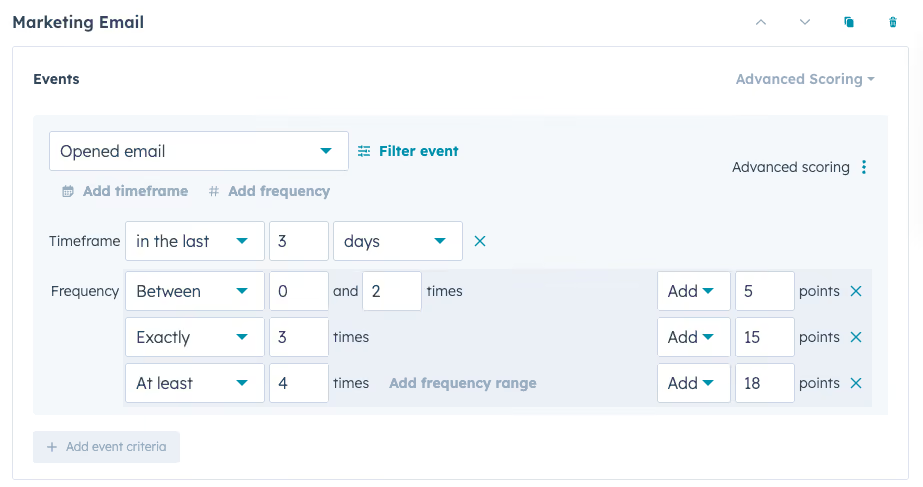
Describe problem: Too many points from repeated actions (e.g., multiple email opens) skew scores high.
Solution: Set timelines (e.g., in the last 3 months) and category limits. Review with historical data to calibrate.
Poor Data Quality or Missing Tracking
Describe problem: Incomplete behavioral data leads to inaccurate scores.
Solution: Audit and implement tracking tools (e.g., HubSpot pixel for pages, EAC or the HubSpot Gmail/Outlook plugin for emails); clean CRM data pre-launch. Set clear expectations with the client that the accuracy is dependent on the data being captured, so it may take time for relevant data to accumulate or they may need to enforce compliance with email tracking tools.
Scores are being influenced by very old data
Describe problem: By default, HubSpot lead scores will pull data from all available data. Sometimes the client will want the score to start tracking only after the go-live date.
Solution: Set up filters on each engagement criteria to only score activities that occur after the go-live date.
Low Team Adoption
Describe problem: Reps ignore scores due to distrust or lack of understanding.
Solution: Provide training sessions, demo videos, and champions; build reports showing score-win rate correlation to prove value. Make it easier for the reps to sort the inbound leads by the score. If the reps have lost trust in the score, remove it from their view, give it some time to accumulate data, refine it, then re-launch it.
Misaligned Criteria with Business Reality
Describe problem: Scores don't reflect actual conversions (e.g., overvaluing low-impact content).
Solution: Analyze closed-won/lost opportunity data against the lead scores and adjust the weights of the scores accordingly.
10. Summary
List of possible next steps:
- Develop custom reports (e.g., win rates by score, average/median lead score by original source).
- Add emerging signals (e.g., new content types).
- Target campaigns at high-grade prospects.
Recurring or follow-up tasks generated: Quarterly/yearly feedback sessions, criteria optimizations, data audits.
When should you revisit this?: Every 6-12 months for full reviews; sooner if new marketing channels launch or conversion trends shift.
What projects does this unlock?: Enhanced ICP modeling, automated workflows for scored leads, A/B testing of engagement signals.