Customer Tagging Playbook: Define Leads, Customers, and Former Customers
Can't answer how many customers you actually have? Build a customer tagging system in HubSpot or Salesforce that auto-updates as accounts convert, renew, or churn.


Table of contents
Introduction to the Project
The project focuses on implementing a set of automations across Accounts, Contacts, and Opportunities to clearly define customer status.
Based on how these objects relate to each other, the automations determine who should be considered a lead, who is an active customer, and who is not a customer at a given point in time.
Problems that this solves:
- Inaccurate segmentation across accounts, contacts, and opportunities
- Inability to clearly distinguish leads from customers for marketing outreach
- Lack of visibility into how many active customers exist at any given time
- Limited segmentation within customer groups, such as customer type, customer tenure, and lifecycle stage over time
Definition of success:
Success is defined by having a single, reliable source of truth for the number of leads and the number of customers.
This means being able to clearly distinguish:
- Accounts that are leads (not yet acquired)
- Accounts that are current customers
- Former Customer
When to Implement?
Examples
- States that may trigger the project (pain points):
- No clear distinction between Leads and Customers
- Inaccurate segmentation for marketing and outreach
- Sales reps don’t know the real status of an account
- No single source of truth for customer counts
- Impossible to segment customers by lifecycle or type
When is the right time to implement this project (prerequisites):
- Customer definition is agreed upon
- What makes an account a customer
- What makes it a lead / prospect
- What makes it no longer a customer
- Opportunity Stages are clearly defined
- Primary objects are defined
- Subscription / revenue signals are identifiable
- Sales and Marketing alignment exists
- Marketing agrees to rely on Salesforce or Hubspot tags for segmentation.
- Sales agrees to maintain the inputs that feed the tags.
- There is a clear “definition of done”
- One trusted customer count
- Clean customer segmentation
- Tags auto-update without manual intervention
KPIs
- Total Number of Active Customers
- How it’s impacted:
- Customer tags create a single, authoritative definition of “active customer.”
- Automatically updates as customers are acquired, renewed, or churn.
- How it’s impacted:
- New Customers per Period (Month / Quarter)
- How it’s impacted:
- Tagging captures the exact moment an account becomes a customer.
- Enables accurate period-based reporting without manual filters.
- How it’s impacted:
- Marketing Campaign Engagement
- How it’s impacted:
- Tags allow exclusion of customers from acquisition campaigns.
- Enables customer-specific messaging and targeting.
- Improves engagement by sending relevant content to the right audience.
- How it’s impacted:
Roles Involved
List the client roles that will benefit from this project:
- Role: Marketing Leadership
- Use customer tags for accurate segmentation.
- Exclude customers from acquisition campaigns.
- Create customer-only and lifecycle-based campaigns.
- Improve engagement and campaign performance metrics.
- Role: Sales Leadership
- Define what qualifies an account as a customer.
- Use tags to get a reliable customer count and conversion metrics.
- Gain trust in pipeline, forecasting, and performance dashboards.
Questions before Implementation
- When is someone considered a customer?
- Can an account stop being a lead?
- When is an opportunity created?
- When will it become a customer?
- What event turns an account into a customer?
- Opportunity marked as Closed Won?
- Contract signed?
- Can an account stop being a lead?
- When is someone considered a lead?
- What specifically makes someone a lead?
- What specifically makes someone a lead?
- When is someone no longer a customer?
- What drives customer status?
- Renewal Opportunities?
- Subscriptions/Contracts?
- What keeps someone an active customer?
- At least one active subscription?
- Contract not expired?
- Can customer status change without a new opportunity?
- Cancellation?
- Non-payment?
- Downgrade?
Step by Step
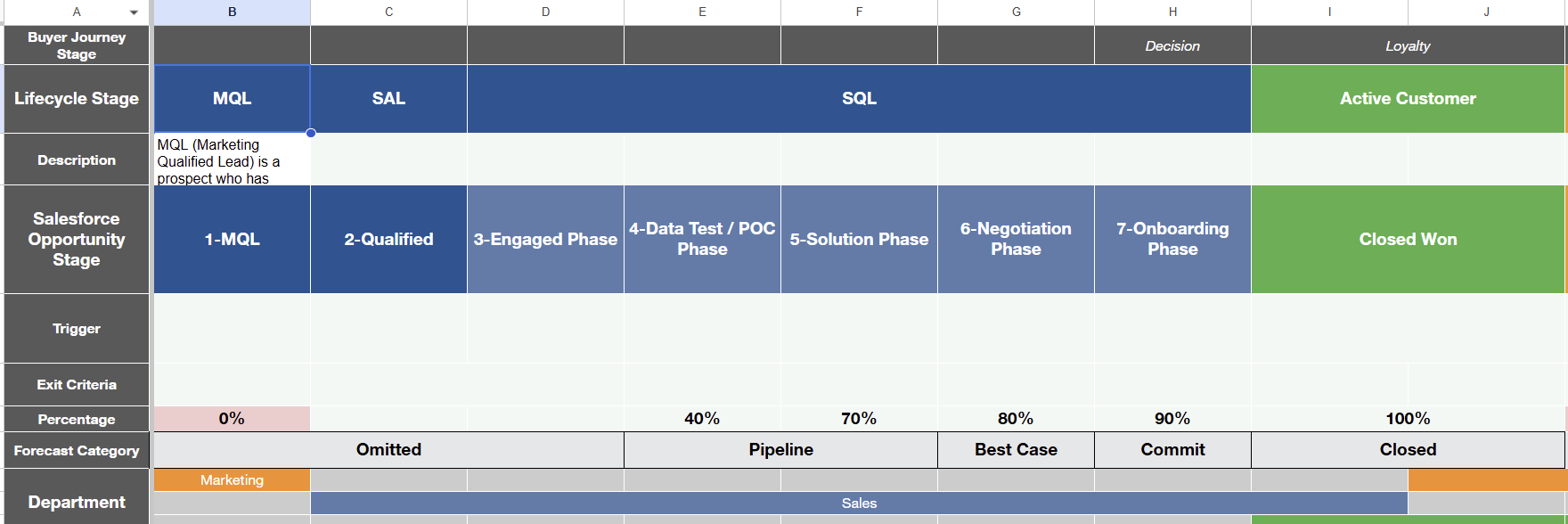
- Step 1: Review the Buyer Journey spreadsheet (alignment workshop)
- What we do first is go through the Buyer Journey spreadsheet with the client, to clearly define the lifecycle rules:
- When an account/contact is a Lead
- When it becomes a Customer
- When it becomes Closed Lost / Not a Customer
- (Optional) When it becomes Churned / Former Customer if subscriptions are involved
- Output of this step: a finalized spreadsheet with agreed definitions and triggers.
- Step 2: Translate definitions into “triggers” Salesforce or Hubspot can detect
- For each status, we confirm what event(s) Salesforce should use as the trigger, for example:
- Note: More often than not, it’s better to start by proposing these triggers with common triggers that we’ve used in the past. Using the Buyer Journey Template is going to be really helpful to move away from the blank.
- Lead trigger (created / form fill / imported / inbound request)
- Customer trigger (Closed Won / subscription active / first invoice)
- Closed Lost trigger (Closed Lost opportunity / no activity for X days, etc.)
- For each status, we confirm what event(s) Salesforce should use as the trigger, for example:
- Step 3: Decide where the status will live (source of truth)
- We align on:
- What object holds the “status” (usually Account, sometimes Contact too)
- Whether we need dates (Customer Start Date, End Date)
- Whether customer status is account-level or product-level
- We align on:
- Step 4: Implement in Salesforce (automation + fields)
- Create fields or use Native ones if possible (Lifecycle Status, Customer Start Date, etc.)
- Build automation (Flow / Workflows)
- Add guardrails (validation rules if needed)
- Step 5: Test with real scenarios
We test common and messy cases:
- Multiple opportunities
- Expansion deals
- Re-activation after Closed Lost / churn
- Manual override behavior (if allowed)
[Image placeholder if needed]
Introduction before Examples, please read carefully :
We started by covering customer tagging and walking through the Buyer Journey template. Now we’ll show one practical way to set up triggers to identify when someone becomes a Lead.
These triggers can be adjusted based on what you want to track (e.g., new clients, churned accounts, won/lost, etc.). In this specific example, we’re focused on lead tagging.
A common next step, after defining triggers in the Buyer Journey template, is to implement them in your system of record, usually via a lifecycle in HubSpot or Status in Salesforce, depending on where you want to manage the client lifecycle.
One important note: in this walkthrough, we’re using a pre-pipeline Opportunity-based approach because the example comes from a HubSpot + Salesforce integrated setup.
If we were working in HubSpot only, We would typically create/update the Lead object stage directly in HubSpot as soon as the triggers are met.
So here’s what we’ll do:
First, we will show how we tag Leads as they move from HubSpot into Salesforce.
Then, we'll show how we track the moment someone transitions from Lead to Customer inside Salesforce.
Bottom line: we’re starting with the first lifecycle stage, tagging someone as a Lead.
Examples of triggers in Hubspot :
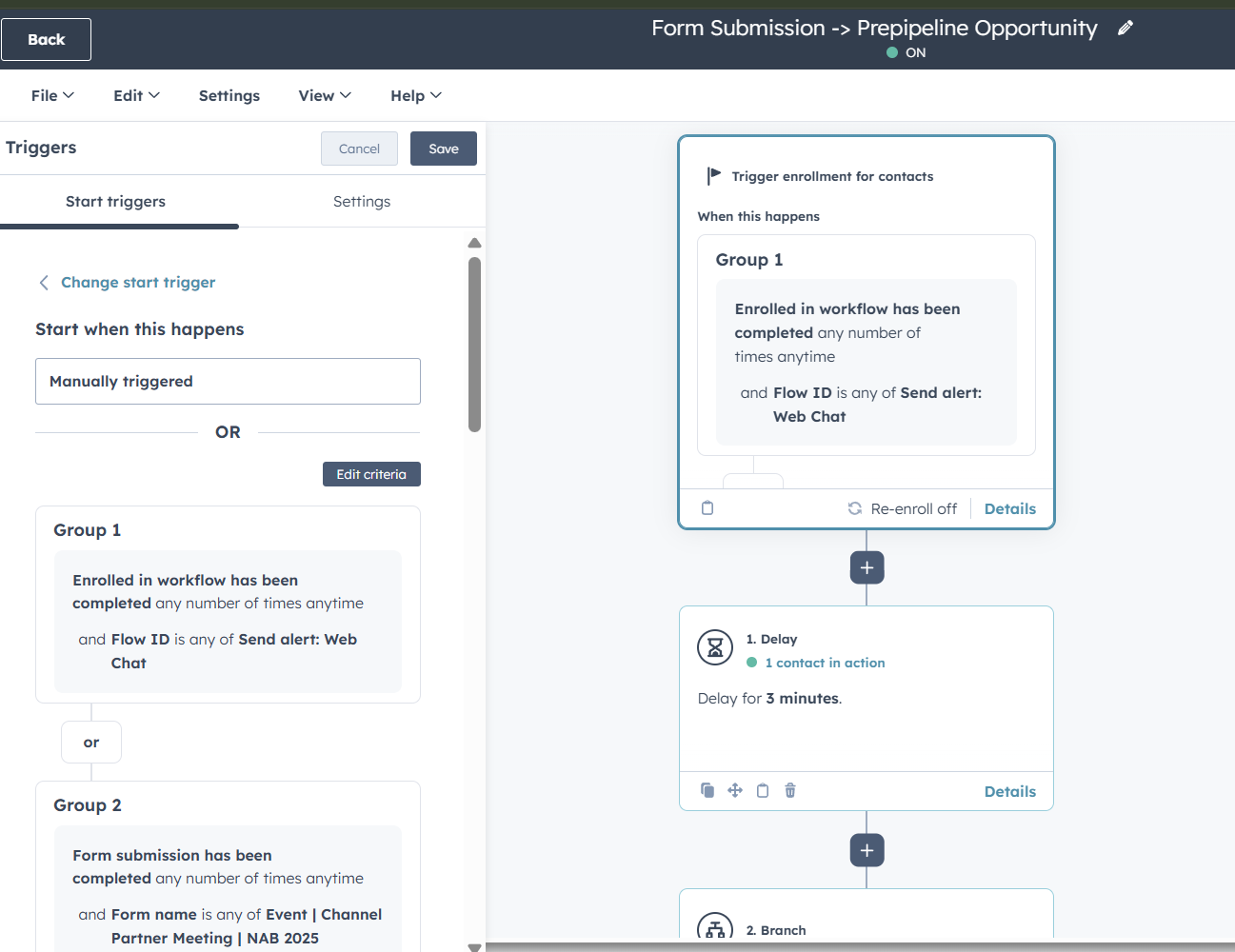
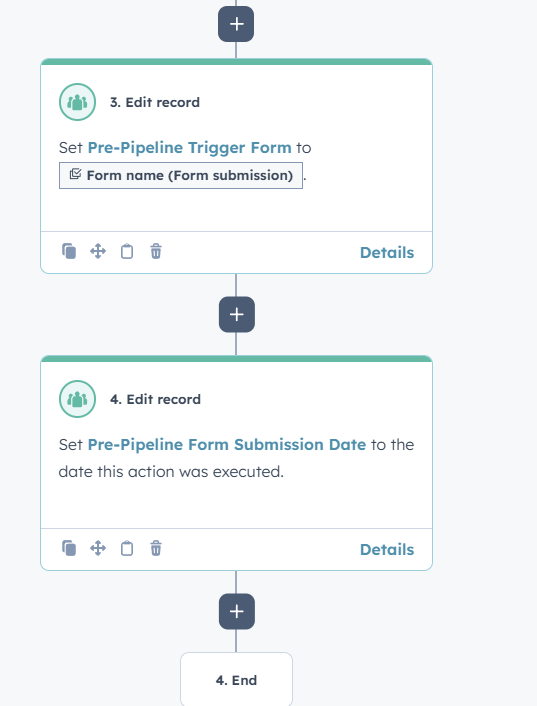
In this example, you can see a HubSpot workflow that’s capturing the different triggers that would convert someone into an MQL (and we could also treat this as a Lead if needed).
For instance, we’re tracking form submissions as one of the triggers. Then, once that trigger happens, the workflow runs the next action, creating an Opportunity in what we’ve been calling “pre-pipeline.”
So basically, the workflow is our way of centralizing and documenting all the HubSpot-based conversion triggers in one place.
Summary
The goal of this initiative is to help clearly define what a customer is, and what a customer is not, so they can achieve accurate, reliable segmentation across Salesforce data.
By aligning on these definitions up front, we can build a customer tagging system that consistently answers:
- When someone becomes a customer
- When they are not a customer
- How customers should be counted
This clarity has a strong downstream impact across Sales, Marketing, Operations, and Leadership by removing ambiguity and improving trust in reporting.
Once the definitions are agreed on, the system uses simple, well-defined automations and data structures to apply and maintain those tags automatically. The exact logic can vary from client to client, which is why it’s critical to spend time upfront aligning on the rules and triggers that reflect how the business actually works.
From an implementation standpoint, the focus should be clarity and simplicity.
Each automation should exist for a clear reason and answer a specific business question. Trying to cover too many scenarios or channels at once can make the system hard to understand and maintain. Starting with a simple, well-scoped setup creates a strong foundation that we can expand over time as needs evolve.
Common challenges you’ll run into during implementation:
- Defining the triggers clearly
In many cases, the client won’t have a fully formed view of the rules yet, or they may propose logic that’s either not feasible or overly complex. This often requires us to lead the conversation, propose a common approach, and guide them toward a practical set of triggers. - Account hierarchy complexity
Customer tagging can get complicated quickly when account hierarchies come into play, for example:
- Multiple accounts benefiting from a single contract
- Subsidiaries upgrading independently vs. being covered under a parent account
- Deciding whether customer status is measured by one shared contract or separate contracts per entity
- Clarifying how to treat different statuses (lead vs. customer vs. customer type)
- Determining who should be engaged: leads vs. decision makers vs. non-buying stakeholders
- Multiple accounts benefiting from a single contract
Architected practical framework addressing customer segmentation misalignment
Most sales and marketing teams can't answer a basic question: how many customers do we actually have? Ambiguous definitions create inflated pipelines, polluted campaigns, and reports nobody trusts.
The Customer Tagging playbook fixes that. We align Sales and Marketing on what qualifies an account as a Lead, Customer, or Former Customer, then build automations in Salesforce or HubSpot that apply those tags without manual upkeep.
The result
One reliable customer count, clean segmentation for campaigns, and pipeline metrics leadership can trust. Tags update automatically as accounts convert, renew, or churn, so the data stays accurate as the business moves.