Lifecycle Stage Reporting Fixes Pipeline Forecasting Gaps
Lifecycle stage reporting fixes inaccurate forecasting and pipeline gaps. Here is the step-by-step playbook for HubSpot and Salesforce RevOps teams.

Table of contents
Lifecycle Stage Reporting Playbook for HubSpot and Salesforce
To build lifecycle stage reporting in HubSpot or Salesforce, do not use the standard HubSpot lifecycle stage property as HubSpot ships it, because the default property cannot move backwards without corrupting stage entry and exit timestamps. See how to customize your lifecycle stages the right way first instead. Use the HubSpot Lead object (HubSpot-only orgs) or pre-pipeline opportunities in Salesforce (HubSpot-and-Salesforce, or Salesforce-only orgs) instead, then build the field structure, automation, and dashboards on top of that architecture. Done correctly, this gives a sales leader a timestamped view of exactly how long leads spend in each stage, which stages are stalling, and the historical conversion rate at every step, which is what accurate forecasting is built on.
Most sales leaders don't have a forecasting problem. They have a data problem disguised as one. RevBlack consistently sees the same pattern across HubSpot and Salesforce instances: lifecycle stages that were never designed for reporting, pipelines built on undefined transitions, and dashboards that contradict each other depending on who pulled the numbers. The result is a forecast leadership can't trust and a funnel nobody can diagnose. This playbook covers the prerequisites, implementation approach, architecture decisions, and common problems for lifecycle stage reporting in HubSpot and Salesforce.
Can your leadership team trust the conversion rates and forecasts coming out of your CRM?
BOOK A FREE CRM AUDITThe HubSpot limitation that shapes every decision
Before building any reporting architecture, one HubSpot limitation shapes every decision that follows, and ignoring it produces reports that are unreliable from day one.
By default, HubSpot does not allow lifecycle stages (standard property) to move backwards. You are allowed to delete and then reassign the lifecycle stages in HubSpot, but that doesn't clear the time the lead entered or exited the stage, so this can corrupt reporting.
The three options RevBlack recommends:
- Use a custom lifecycle stage property
- Track lifecycle stage with pre-pipeline opportunities
- Use the Lead object in HubSpot
When re-entering a stage that the company cares about, data will be overwritten and historical data will be lost. If it is possible or common for people to progress through the funnel more than once, do not use the standard lifecycle stage for reporting. Use the HubSpot Lead object or a pre-pipeline opportunity instead.
What lifecycle stage reporting solves
Lifecycle stage reporting directly addresses the visibility gaps that prevent sales and marketing leadership from making reliable decisions about pipeline, forecasting, and lead quality.
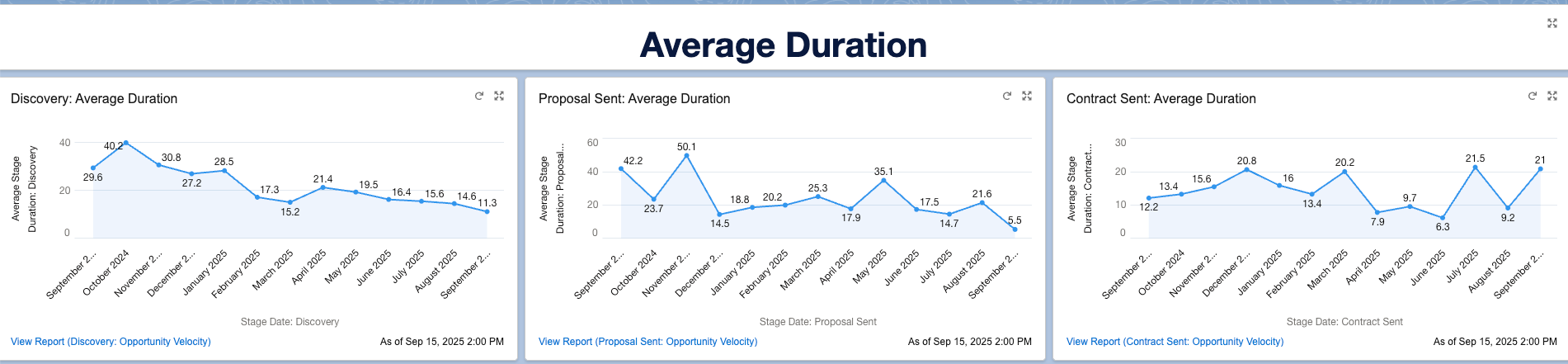
The purpose of reporting on lifecycle stages is to accurately track contact progression throughout the company's funnel. This enables RevBlack to clearly see how much time it takes for a lead to become a customer (sales cycle length) and identify obstacles or friction along the way, by checking conversion rates from one stage to another and where leads are stalling.
Lifecycle stage reporting directly addresses:
- Lack of visibility into time spent per stage: Not being able to measure the main gaps and problematic stages in the funnel
- Lack of visibility into total sales cycle length: No clear view of how long the full journey takes from lead to customer
- Lack of visibility into pipeline problems: Without conversion rates, you cannot spot which stages need attention and where leads are getting stuck
- Inaccurate forecasting: The best way to predict deal closure is knowing historical conversion rates. Without knowing the average probability a deal has of becoming Closed Won, the pipeline forecast is unreliable
- Lack of visibility into lead quality and sales efficiency: Lifecycle stage reporting lets you precisely identify where leads are falling out in early and advanced stages of the funnel. Combined with lost or disqualification reasons, you can understand why and either improve lead quality alongside marketing or improve sales techniques like discovery and proposals
What success looks like
Success for lifecycle stage reporting is measurable, RevBlack defines it as the point where leadership can make forecasting and pipeline decisions from a single trusted source of data.
- The organization has a dashboard with reports that clearly show sales cycle length, conversion rates between stages, and conversion rate from each stage to Closed Won
- Forecasting has become accurate for sales leaders
- The company is not losing a significant number of leads due to lead quality issues
- The sales cycle length has decreased from previous benchmarks
- Closed Won rates have improved

When to implement lifecycle stage reporting
Lifecycle stage reporting is the right project when leadership has lost confidence in the numbers, but the conditions to build it reliably need to be in place first.
Pain points that may trigger this project:
- "I do not trust my forecasting. What's in Salesforce is very different from what happens in the real world."
- "I don't know how much time it is taking sales to close a deal."
- "I know we have gaps in the sales journey, but I don't know what or where they are."
- "It feels like marketing generates a good amount of leads but we cannot close much of that."
Prerequisites before starting:
- The client has defined their lifecycle stages and how they are associated with pipeline stages, including entry and exit criteria
- Data quality is good in the client's org. Building the architecture to track lifecycle stages can be tricky if there are lots of duplicates in the CRM, especially for clients that sync HubSpot and Salesforce
- The client is able to track lead engagement, first contact, website visits, interactions with website, first conversion
- Unified marketing and sales processes are in place
- Consider completing the Buyer Journey Matrix first
- Necessary field structure exists to track lifecycle stage progression
The six KPIs this impacts
Lifecycle stage reporting improves six metrics that span the full revenue funnel, from lead quality at the top to closing efficiency at the bottom.
Sales Cycle Length: By reporting on lifecycle stages, leadership will know how much time leads spend in each stage. With that data, they can develop strategies to reduce the cycle length.
Conversion Rate: By reporting on lifecycle stages, leadership will know which stages are most problematic, where leads are dying or getting stuck. With that, they can develop targeted strategies to improve conversion.
Accuracy of Revenue Goals Attainment: By accurately knowing conversion rates, which leads to forecasting accuracy, the team will be able to get very close to achieving their revenue goals, assuming processes and recommendations like a 3x pipeline coverage ratio are followed.
Number of MQLs, SALs, and SQLs: By identifying the profile of leads that drop out in early stages, leadership can improve marketing efforts and targeting to generate more qualified leads.
Closing Rates: Lifecycle stage reporting leads to overall improvement in the sales journey, especially in more advanced stages like proposal and negotiation. Combined with a reduced sales cycle length, this produces a more efficient sales team that closes more deals.
Lead Velocity: Measures how fast leads progress between stages, a direct indicator of funnel health and rep efficiency.
Who's involved
Lifecycle stage reporting is a cross-functional project, it changes how sales reps work, how managers review the funnel, and how leadership makes decisions. RevBlack aligns all three groups before building.
Sales Representatives benefit from lifecycle stage reporting because it identifies gaps in the sales process. Sales reps will be instructed on how to improve their efforts and actions in each stage, which means their actions and routines will adapt to new, better-defined processes.
Revenue Managers (Marketing and Sales) are the central piece of this project. Marketing and Sales Managers and Directors will be responsible for monitoring lifecycle stage reports, identifying gaps, and making decisions on how to improve them. Lifecycle stage reporting should be discussed in leadership meetings, with Marketing and Sales working together on lead quality improvements based on report findings.
Management positions related to sales (CRO, CFO, Director of Sales) should be consulted for insights and feedback, depending on the size of the organization. They will also receive report analyses that show the health of the company's lifecycle journey.
Tools required
The tool requirements are minimal, the architecture lives inside the CRM the client already uses, with optional additions for reporting export and contact enrichment.
CRM (HubSpot or Salesforce) is where RevBlack builds the entire architecture that enables lifecycle stage reporting. This includes:
- Fields that hold relevant information: lifecycle stages, pipeline stages, time spent in each stage, and conversion rates
- Automation, how pipeline progress impacts the lifecycle stage of an associated lead. This will vary depending on the approach (HubSpot Lead object or pre-pipeline opportunities)
- Dashboards and reports
Excel or PowerPoint (Optional): Used in cases where leadership wants to export data from reports for use in spreadsheets or presentations.
Contact creation or update tools (Optional): Tools like Clay or Gong that create or update contacts in the CRM.
Discovery questions to ask before you build
The discovery questions below determine the architecture approach before any configuration begins, answering them incorrectly or incompletely is the most common cause of rework after launch.
- How does a lead enter your ecosystem? Through which channels, forms, imports, events, ads, are new leads created?
- How are you tracking lead interactions with your brand? Which systems are you using to measure that?
- Are you currently measuring lead scoring?
- At what point does the handoff to sales happen?
- What are your sales pipeline stages? Are they lead-centered and do they cover all the steps a sales rep should take during a sale?
- How do your pipeline stages relate to your lifecycle stages? What pipeline stages trigger changes in lifecycle stage?
- How are you tracking ROI for marketing efforts?
- What are your sales motions? Outbound, inbound, events?
- What is the average time for a deal to be closed? What are the steps that take the most time to complete?
- What are the stages of the marketing funnel and the time spent in each stage?
How do you implement lifecycle stage reporting?
RevBlack implements lifecycle stage reporting in five phases, scoping first, building last. Skipping the scoping and planning phases is the fastest way to build architecture that doesn't match how the client's funnel actually works.
Phase 1: Scoping
- Meet with the client to ask the relevant questions, including those listed above. This gives you a solid foundation to start the project.
- Do personal discovery. Go into their system and review what assets related to lifecycle stages are already in place:
- Are they currently reporting on lifecycle stages? If so, are they using the standard functionality?
- What automations impact lifecycle stages?
- What is the quality of the reports and dashboards? Are they accessible to relevant stakeholders?
- If you have findings during your personal audit, go back to the client with additional questions or suggestions.
Phase 2: Planning
After scoping the client's current situation, plan the best approach to build lifecycle stage reporting:
- HubSpot only: Use the Lead object. The HubSpot Lead object can easily sync with contacts and deals without requiring complex automation. See the HubSpot Lead Object Playbook.
- HubSpot and Salesforce: Use pre-pipeline opportunities. Given the complexities surrounding the sync, pre-pipeline opps eliminate the need for the Lead object in Salesforce, syncing contacts in HubSpot directly to contacts in Salesforce. It is more complex to use the Lead object in Salesforce, pass info to the contact, sync to Salesforce, and then pass info to the opportunity — so pre-pipe opps are the simpler path.
- Salesforce only (rare): Use pre-pipeline opportunities. The HubSpot Lead object is not an option in this scenario.
Phase 3: Building the Architecture
After deciding the best approach, build the solution:
HubSpot only (Lead Object)The Lead object in HubSpot creates a Lead record associated with a contact. A contact may have multiple leads associated, for example, one created every time the contact submits a form — without overwriting data on the contact. RevBlack designs specific fields on those individual records and how they progress through the Lead funnel, associates them with lifecycle stages, and builds reports from the Lead object. See the HubSpot Lead Object Playbook.
HubSpot and Salesforce, or Salesforce only (Pre-Pipeline Opportunities)Similar to the Lead object approach, RevBlack works on the Opportunity object in Salesforce. Whenever a lead submits a form, or becomes an MQL, depending on the agreed triggers — an Opportunity record is created for that lead. These individual records allow RevBlack to report on how many MQLs, SALs, SQLs, and Customers were created in any given period, the same way the Lead object works in HubSpot.
Contact records will register how far each contact progressed. If a contact submits a form and drops out at the MQL stage, that will be registered on the contact until they re-engage and progress to the Opportunity stage. Automations handle passing the Lead or Opportunity information to the associated contacts, which hold that information so it does not get overwritten.
Phase 4: Testing
Quality assurance is a mandatory step. RevBlack must confirm that all automations are properly working and fields are correctly getting populated. The solution cannot be delivered to the client without completing this step.
Phase 5: Building Reports
After the architecture is built and tested, RevBlack builds the reports and dashboards. This requires confirming that the stamping of stages, times of entry and exit per stage (to calculate time spent in each stage), and how that ties back to the contact have all been automated correctly.
Common problems, and how to fix them
Most lifecycle stage reporting failures trace back to three structural issues, not tooling gaps. RevBlack sees these consistently across HubSpot and Salesforce implementations.
Cannot move the standard lifecycle stage property backwards in HubSpot.The standard lifecycle stage property cannot be rolled back to earlier stages. Even with a custom property, rolling back creates messy entry times, either by not being rewritten in the standard case or by erasing data in the custom case.Solution: Work with one of the recommended approaches, the Lead object in HubSpot or pre-pipeline opportunities in Salesforce.
No lead-centered sales pipeline covering all relevant sales process steps.Without a clearly defined pipeline, RevBlack cannot establish the correct process to follow. This makes it impossible to automate how pipeline progression ties back to lifecycle stages, and prevents building reports with the correct view.Solution: Review the client's sales pipeline stages, define clear entry and exit criteria, and establish how they will impact lifecycle stages. After this, build the necessary automation and field structure to support the reports.
Lack of structure to collect data.This is the most common problem. The client is usually using the standard lifecycle stage functionality, and the desired reports cannot be built on top of it.Solution: Define the path forward, Lead object in HubSpot or pre-pipeline opportunities in Salesforce — and build the necessary architecture to capture the relevant data for reporting.
What happens after implementation?
A live lifecycle stage reporting system is a starting point, RevBlack treats it as a living architecture that gets updated when the business changes.
When should you revisit this playbook?
- When the sales process changes, stages are added or removed, or entry and exit criteria change
- When MQL, SAL, or SQL definitions change
What projects does this unlock?
- Enhancement in sales process efficiency
- Improved lead targeting for marketing
For teams working through lifecycle stage definitions before building the reporting architecture, the Lifecycle Stage and Lead Management guide covers the alignment and definition work that needs to happen first. For teams managing HubSpot and Salesforce together, the HubSpot Salesforce integration architecture covers how stage definitions connect to lifecycle reporting across both systems.