How to Build Salesforce Flows for RevOps Teams
You can build salesforce flows that scale with the right naming conventions, governor limits, and error handling. Here is the go-live checklist to use.

Table of contents
When Should You Use Salesforce Flow?
Before opening the Flow Builder, we need to understand the why and the what. If you want a quick rundown of the common mistakes and misconceptions that keep most orgs from getting full value out of Flow, start with Salesforce Flows best practices you're probably missing.
Need help building or auditing Salesforce Flows in your org?
BOOK A FREE CRM AUDITConsider flow automation when:
Manual Triage — Sales reps are manually routing leads or assigning tasks.Are the sales reps manually moving information or data from one location to another inside of Salesforce? How is information being calculated or collected?
Inconsistent Data — Lifecycle stages are skipped, or required fields are ignored.Does the client claim that their reporting is "bad", or that they "can't rely on Salesforce data"?
External Processes and Systems — Critical logic lives in spreadsheets rather than Salesforce.Are the sales reps utilizing spreadsheets to track leads? Is fulfillment, finance, pricing, or any other team currently doing something that could be more easily automated using Salesforce Flow?
Lack of Visibility — Reporting is impossible because data isn't stamped at the right time.What are the metrics that we are tracking that are time-based? For example: speed-to-lead, pipeline velocity, etc.
Which KPIs Do Salesforce Flows Impact?
Flows are not just about saving clicks — they drive business outcomes. Connect every flow to a KPI. Here are some examples of KPIs that can be automated via Flow:
- Speed-to-Lead — Reduce time from capture to assignment
- Conversion Rates — Improve lifecycle stage progression
- Pipeline Velocity — Reduce the time an Opportunity spends in each stage
- Data Completeness — Enforce mandatory fields via Screen Flows to improve forecast accuracy
- Task SLA Adherence — Automate follow-up prompts to ensure accountability
What Questions Should You Ask Before Building?
Ask these questions to define success before building.
Definitions of Success
- What does "good" look like after this automation is live?
- What is this process going to look and feel like for the end-user?
- What would their team be happy to see automated?
- What are the main frustrations or pain points with Salesforce in the company right now?
Process Clarity
- Walk us through the exact steps of the current process. Where does it break?
- When are you currently going outside of Salesforce as a part of your processes? What software are you using and what is the goal that you are accomplishing with that software?
- What parts of your day-to-day are taking up the most time?
- How is data currently being input into the system?
- What calculations are being done manually?
Outcomes
- Are we solving for speed, data quality, or user experience? Rank them.
- What does the perfect system or CRM look like to you?
- What do you expect from Salesforce?
Exceptions
- What are the common exceptions to this rule? For example: "Routing is usually by territory, unless it's a strategic account."
- When does a record not follow the typical processes or guidelines?
- What approvals are necessary in the entirety of the sales process?
- What approvals take place in the fulfillment or CS process, if any? If there are no approvals currently in place, should there be?
User Experience
- Do users need a guided wizard (Screen Flow) or should this happen in the background (Record-Triggered)?
- How does your team handle change?
- What is the expectation for UAT, documentation, onboarding, and go-live for implementing a new automation?
- Who is communicating these changes?
- Is the team aware that changes are going to be taking place?
Should You Use a Flow, or Is There a Better Tool?
Golden Rule: You can do almost anything with a Flow, but that does not mean you should.
Consider the alternatives:
- Data Enrichment — If the goal is to fill in missing fields, consider tools like Apollo, Gong, or Clay instead of complex logic to infer data.
- Deduplication — Use tools like Insycle or others for complex duplicate management rather than building massive dedupe flows.
- Formula Fields — If you just need to display a value from a parent record, use a Formula field, not a Flow update.
The Toolbox:
- Salesforce Flow Builder — The primary engine behind this
- UnofficialSF — A library of community-built flow components (e.g. enhanced lookups, success toasts, etc.). Use with caution and verify functionality and security/maintenance.
- Flow Trigger Explorer — To manage the order of execution for record-triggered flows. Does one flow need to occur before or after another in the process?
- Automations App (App Launcher) — Native app in Salesforce to manage all of your automations, flow details, errors, and other automations/actions in one place. Tip: Use this to organize your flow by using standard list views and filters.
What Is the RevBlack Standard of Craftsmanship for Salesforce Flows?
- Scalable — The flow continues to function efficiently as the business grows and data volumes increase (e.g., bulk-safe)
- Expandable — The automation is built in a way that allows us to easily revisit, adjust, and add new logic without breaking existing functionality (modular)
- Repeatable — We use consistent naming conventions and patterns so any consultant can pick up where another left off
- Simple — We avoid over-engineering. If a solution is too complex, it is likely fragile.
- Efficient — We respect governor limits and user time
Best Practices for Building Salesforce Flows
Plan before you build.Map out what you are going to be building in Miro or on a whiteboard. Understand all of the decisions, elements, records, calculations, outcomes, loops, and transformations taking place in the flow.
- Start with the question: What is going into the flow and what needs to come out at the end?
- Explore triggers and other flows: Find the other flows that are activated on the same object with the same conditions. Understand how your flow fits into the big picture.
Safeguards.Consider the effects of your flow. Is this flow going to be touching important or vital information that would cause serious operational problems if the flow were to go wrong? Put in place the proper safeguards with these considerations in mind.
- How can I ensure that this flow will activate when and only when I want it to? If record-triggered, what are the entry criteria for this flow?
- What are the fault paths and/or safeguards that I am putting in place to ensure that the entirety of the flow functions according to my intentions?
Governor Limits and Batch Considerations.How many records are going to be processed in this flow?
IMPORTANT:
- NEVER PERFORM DML (CREATE, UPDATE, DELETE) INSIDE A LOOP
- NEVER PERFORM SOQL (GET RECORDS) INSIDE A LOOP
Instead, use collection variables. Add records to a collection variable inside the loop, then perform a single update or create element on the entire collection after the loop finishes.
If you plan for there to be a large number of records needing to be updated at one time, consider alternative solutions such as batch Apex that are designed for high volume. Record-trigger flows can fail and cause issues if there are too many records trying to enter the flow at once.
No Hard-Coding.Never use specific IDs (e.g., 00123456…) in flow elements. IDs change between sandbox and production environments. Your flow will fail when deployed to production if you have hard-coded a variable.
What Are the Naming Conventions for Salesforce Flows?
To ensure repeatability, every consultant must use the following naming structure. This allows us to instantly identify a flow's purpose just by looking at the list view.
Flow Label Format: [Object] - [Context] - [Description]
| Type | Format | Example |
|---|---|---|
| Record-Triggered | Object - RT - Context - Summary | Opportunity - RT - After Save - Create Renewal Task |
| Screen Flow | Object - Screen - Summary | Account - Screen - Create New Contact |
| Subflow | Global/Object - Subflow - Summary | Global - Subflow - Error Handler |
| Schedule-Triggered | Object - Schedule - Summary | Lead - Schedule - Daily Stale Lead Cleanup |
Variable Naming:
- Collections:
colLeadsToUpdate - Single Records:
varSingleLead - Formulas:
forIsNewRecord - Constants:
constTaxRate
How Should You Document a Salesforce Flow?
Every Flow should have the description field filled out in the Flow Builder properties. Use this template:
Purpose: [One sentence on what business problem this solves]
Trigger: [When does this run? e.g., Opportunity Stage changes to Closed Won]
Key Actions: [e.g., Creates Renewal Opp, Emails Finance]
Owner: [Consultant Name / Date]
How Should You Handle Flow Errors?
- Fault Paths — Every DML element (Create/Update/Delete) should have a "Fault" path connected to an error handling mechanism.
- User Experience — For Screen Flows, show a friendly error message. For Record-Triggered flows, log the error to a custom object or send an email to the admin team.
What Are the Technical Rules for Record-Triggered Flows?
Before-Save vs. After-Save:
- Before-Save (Fast Field Updates) — Use this to update fields on the record that triggered the flow. It is much faster (10x) than After-Save.
- After-Save (Actions and Related Records) — Use this if you need the Record ID (which doesn't exist yet on create) or need to update related records (e.g., creating a Task when an Opportunity is won).
Entry Conditions:Be specific. Instead of running on every update, use "Only when a record is updated to meet the condition requirements" to save system resources.
What Are the Technical Rules for Screen Flows?
The recordId Variable:
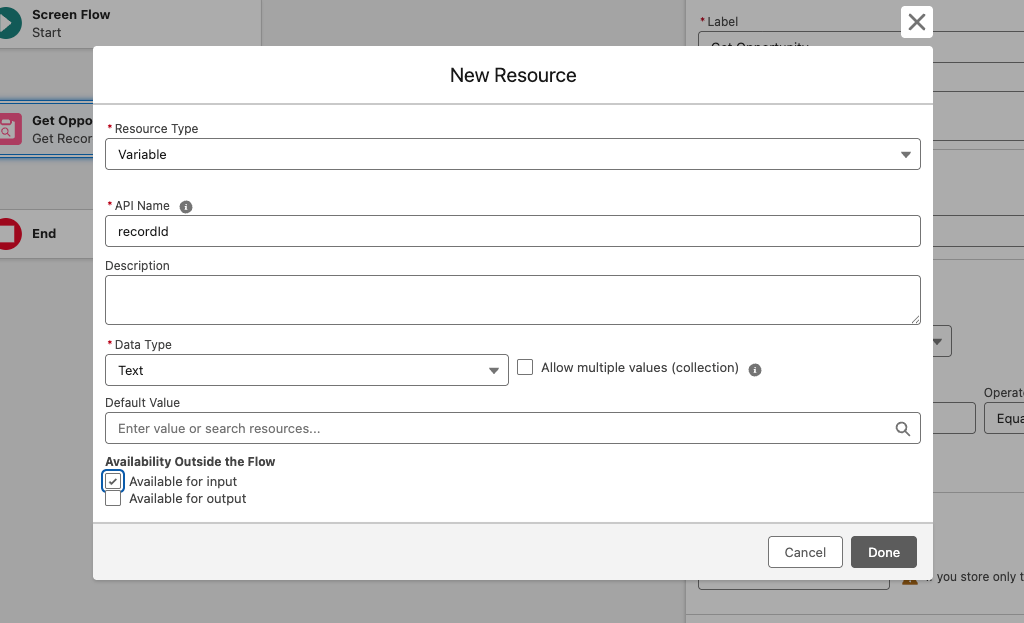
To automatically pass the current record's ID into a Screen Flow (e.g., from a Quick Action), you must create a text variable named exactly recordId.
CRITICAL: It is case-sensitive. It must be lowercase r, capital I. (RecordId or recordid will not work.)
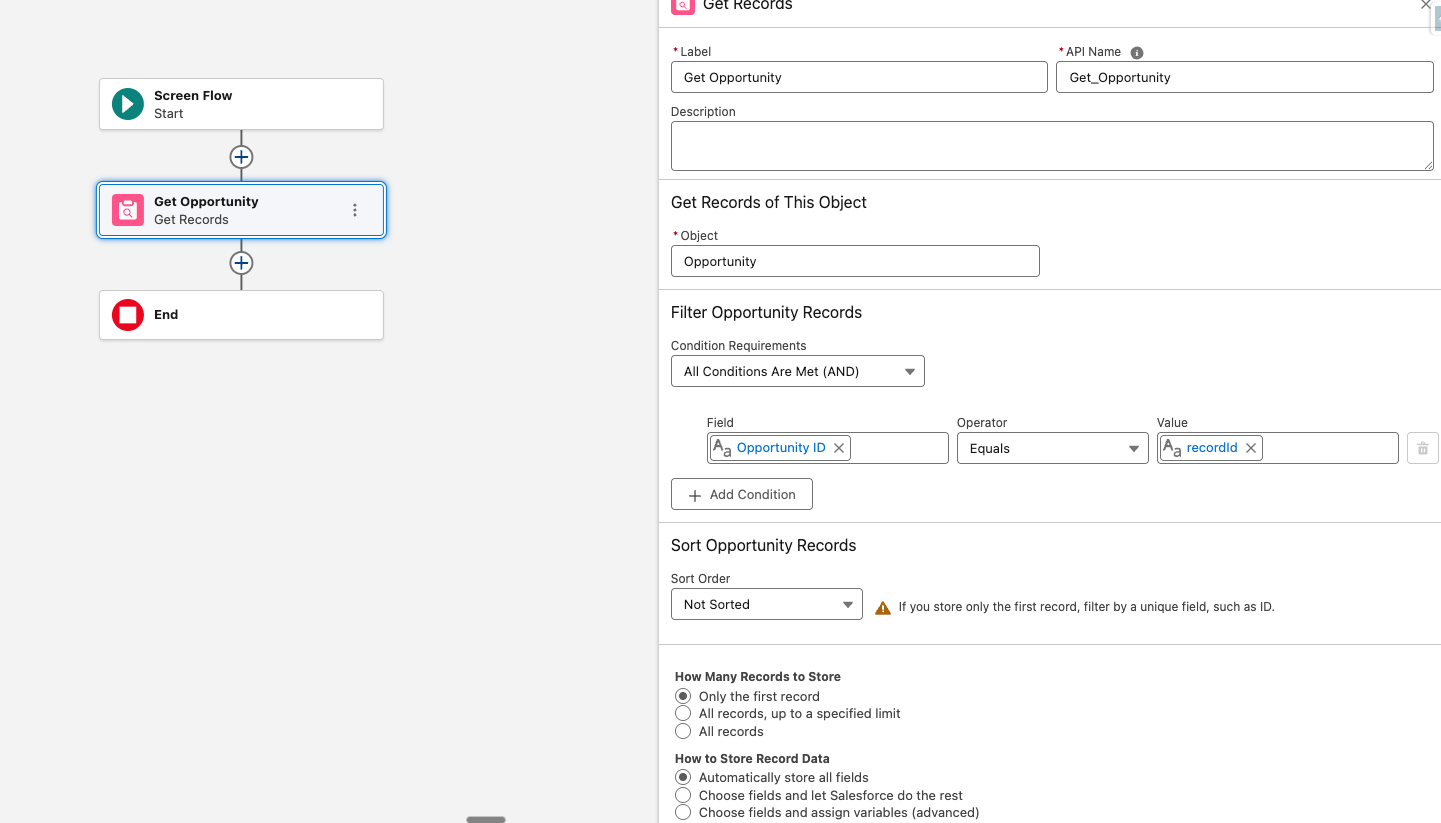
To start the flow, you will use this recordId variable in your Get Record to retrieve the record where the flow began from (e.g., an action button on the opportunity page — recordId will retrieve the ID of that opportunity).
Lookup Components:
- Configuring the Lookup component is notoriously tricky.
- API Name — This is the API name of the lookup field on the source object, not the object itself.
- Field API Name — Ensure you are referencing the correct relationship name.
Navigation:Control the "Previous" button. If a user goes back, will it duplicate data? If so, hide the Previous button on the subsequent screen.

DML Elements:Do not place create, delete, or update elements between screens unless you have a specific reason to. What if the user cancels the flow halfway through? Will there be floating records that were created prior to completing the screen flow?
Only perform DML actions at the end of the flow.
What Are the Advanced Elements in Salesforce Flow?
The Transform Element:Use the Transform element to map data from one collection to another without using a Loop. This is cleaner, faster, and reduces complexity.Use case: Converting a list of Leads into a list of Contacts.
Subflows: Break complex logic into reusable Subflows (e.g., "Error Handler," "Send Slack Notification").
Warning: Subflows in Record-Triggered flows run in the same transaction. If the subflow fails, the parent flow fails.
What Are the Most Common Salesforce Flow Challenges?
People and Client Challenges
| Challenge | Cause | Solution |
|---|---|---|
| "I hate Screen Flows" | Users feel flows are clunky | Optimize the UX. Use Reactive Screens to make it feel like a modern app. Use default values so they type less. |
| Shadow Processes | Users bypass the flow | Ensure the flow provides value to them (e.g., "If you use this flow, it automatically updates your forecast so you don't have to"). |
| Adoption | Users don't know the flow exists | Place the button prominently. Use Conditional Visibility on Lightning Pages to show the flow only when relevant (e.g., "Missing Information" section). |
Technical Challenges
| Challenge | Cause | Solution |
|---|---|---|
| Flow fails for specific users | Likely a permission issue | Check if the flow needs to run in "System Context" (ignores user permissions) or if the user is missing access to a field or record type. |
| Apex CPU Time Limit Exceeded | Looping through too many records or DML inside a loop | Bulkify. Move DML out of loops. Check for recursive flows (Flow A triggers Flow B which triggers Flow A). |
| Mixed DML Errors | Updating a Setup object (User) and a standard object (Account) in the same transaction | Use a "Pause" element or an Async path to separate the transactions. |
| Lookup Component weirdness | "I can't see the record" | Check the running user's permissions to the object being looked up. |
Go-Live Checklist
Use this checklist before activating the flow in production.
Pre-Deployment (Sandbox)
- Debug Run: Passed the "Happy Path" (expected behavior) and "Sad Path" (error handling)
- Bulk Test: Tested with 50+ records to ensure no SOQL/Governor limits
- Null Check: Tested what happens if a field is empty (does the flow crash?)
- Description: Flow Description field is filled out using the template
Deployment
- Dependency Check: Are all new fields, templates, and queues deployed?
- Order of Execution: Checked "Flow Trigger Explorer" to ensure this flow runs in the correct order relative to others
Post-Deployment (Production)
- Smoke Test: Manually create/update a record in Production to verify the trigger works
- Monitoring: Check the "Apex Jobs" and "Flow Error" emails for the first 48 hours
Summary
Salesforce Flows are powerful but unforgiving. A single poorly built flow can hit governor limits, cause record-save failures, create infinite loops, or silently corrupt data across thousands of records. Because flows run in a shared transaction context with triggers, validation rules, and other automation, small inefficiencies compound fast — a DML statement inside a loop or an unbounded Get Records element can take down a production org.
Best practices exist to prevent these failure modes before they ship: bulkification, fault paths, Before-Save vs. After-Save discipline, and proper entry conditions aren't stylistic preferences — they're the difference between automation that scales and automation that breaks under real-world data volume.
Beyond stability, best practices solve the strategic and maintenance problems. Not every process should be a Flow — sometimes a formula field, an enrichment tool, or a dedupe app is the right answer, and discovery questions tied to real KPIs (speed-to-lead, pipeline velocity, data completeness) are what separate automation that drives business outcomes from automation that just saves clicks.
Once a flow is the right call, standards like consistent naming conventions, filled-out description fields, modular subflows, and a go-live checklist keep the org auditable and changeable. Flows are visual, which makes them feel approachable, but that same visual nature hides complexity. Without these standards, admins inherit canvases with hundreds of elements and no documentation, every new requirement becomes archaeology, and the automation layer turns into technical debt that slows the entire business down.