Lead Source Attribution Playbook Fixes Direct Traffic Loss
A lead source attribution playbook stops leads from disappearing into Direct Traffic. Here is how to build first and last touch tracking in HubSpot.


Table of contents
Scope of Project
What’s included?
- Designing a custom source taxonomy (Online, Offline, Integrations).
- Creating custom properties for "First Touch" and "Last Touch."
- Building workflows to stamp attribution data onto Contacts and the Lead/Pre-Pipeline Object.
- Instructions for using UTMs correctly.
What’s not included?
- Multi-touch attribution models (linear, time-decay, etc.) using third-party tools (unless specifically scoped).
- Cleaning up historical data prior to the engagement (unless scoped as a backfill project).
Not sure which channels are actually driving revenue for your business?
BOOK A FREE ATTRIBUTION AUDIT1. Introduction to the Project
Description: This project establishes a robust system for accurately and confidently tracking where contact creation and conversions originate. It moves beyond HubSpot's native Traffic Source properties—which cannot be edited and which struggle with offline sources—to a custom property structure that captures both First Touch (acquisition) and Last Touch (conversion/opportunity creation).
Problems that this solves:
- The "Direct Traffic" Black Hole: Clients often see high volumes of Direct Traffic or Offline Sources, which usually indicates broken tracking or a lack of UTM strategy.
- Budget Anxiety: Marketing directors spending budget (e.g., $10k/month) without knowing which channels (Ads, Events, Social) are actually generating revenue.
- Data Overwrites: Native UTM properties get overwritten with every new interaction. Without a "stamping" mechanism, you lose historical context on how a Lead/0-stage was generated.
- Messy Integrations: Contacts created via integrations (e.g., ZoomInfo) default to generic "Offline Sources" buckets without an easy way to access this information.
Definition of success:
- Granular Visibility: Ability to identify specific sources (e.g., "Paid Social - LinkedIn" vs. just "Paid Social") for every contact.
- ROI Reporting: Ability to tie closed revenue back to specific marketing campaigns or sales prospecting efforts.
- Reduction in "Unknowns": Significantly reducing the percentage of leads categorized as "Direct Traffic" or generic "Offline Sources."
2. When to Implement?
Client states that may trigger the project (pain points):
- The client cannot answer questions like "Which ad campaign gave us this lead?".
- Marketing leadership feels "crazy anxious" about budget allocation due to lack of proof of performance.
- The client has a high volume of "Direct Traffic" or "Offline Sources" in their current reports.
- The client is using hidden fields on forms but finding the data unreliable or incomplete.
When is the right time to implement this project (prerequisites):
- Ad Account Access: Client must have access to their ad accounts (Google, LinkedIn, Meta) to implement new UTM tracking templates.
- Sales Process Definition: We need to know if they are using the Lead Object or a Pre-Pipeline Opportunity, as this dictates where we stamp the Last Touch data.
3. KPIs
- Marketing ROI:
- How it’s impacted: By accurately tracking sources, we can calculate the exact revenue generated from specific spend, allowing for smarter budget decisions.
- Lead Generation Volume by Source:
- How it’s impacted: Reveals which channels are actually feeding the top of the funnel.
- Pipeline Generation:
- How it’s impacted: Distinguishes between sources that generate "noise" versus sources that generate qualified opportunities.
4. Client Roles Involved
- CMO / Marketing Director:
- Benefit: They are the primary beneficiary. It relieves budget anxiety and justifies their spend strategy.
- Marketing Operations / Manager:
- Involvement: They must adopt the UTM building best practices and ensure all future campaigns use the new tracking URLs.
- Sales Leadership:
- Benefit: Provides context on where leads are coming from (e.g., "This lead came from the Webinar," vs. "Cold Call").
5. Tools
- HubSpot Marketing Hub:
- How it’s used: The core database for the custom properties, workflows, and attribution reporting.
- Tracking URL Builder:
- How it’s used: Used to generate standardized URLs with UTM parameters (Campaign, Source, Medium, Term, Content). This can be HubSpot's native tool, a spreadsheet, or third-party tool like Google Tag Manager.
- Salesforce (Optional):
- How it’s used: If the client uses Salesforce, we may need to map these custom fields to Salesforce to ensure the "Last Touch" is visible on the Opportunity layout.
- Google Analytics (Recommended):
- How it’s used: Useful for validating page view data and cross-referencing traffic sources if HubSpot data looks suspicious.
6. Questions before Implementation
What do we need to know before starting:
- Current Tracking: How are you currently tracking lead sources? Are you using UTMs consistently?.
- Source Inventory: What are all the ways a person can enter your database? (Think: Ads, Webinars, Tradeshows, ZoomInfo, Manual Uploads, Chatbots) .
- Ad Accounts: Are your ad accounts connected to HubSpot?.
- Integration Behavior: Do you have integrations (like ZoomInfo or Apollo) creating contacts? If so, how are they currently tagged?.
- Sales Handoff: Do you use the HubSpot Lead Object or a Pre-Pipeline Opportunity deal stage? (Crucial for determining where to lock/stamp the "Last Touch") .
7. Additional Details and Context
- The "Direct Traffic" Myth: If a client sees 80% Direct Traffic, it is broken. Real direct traffic (typing a URL) is rare for new leads. This is the biggest red flag necessitating this playbook.
- Custom vs. Native: We do not rely solely on HubSpot's Traffic Source properties because the drill-down fields cannot be edited or customized. We build Custom Properties (e.g., First Touch Source and First Touch Source Detail) so we can write workflows that say "If Native Source is 'Integration', set Custom Source to 'Sales Prospecting'".
8. Step by Step
Step 1: Architect the Source Taxonomy
Create a spreadsheet to map out all sources. You should generally follow a hierarchy:
- Category: High level (Inbound, Outbound, Referral, Event).
- Sub-Category: Specific channel (Paid Social, Organic Search, ZoomInfo).
- Detail: Granular info (LinkedIn, Google, Trade Show Name).
- Campaign: The specific marketing campaign.
Note: Document offline sources carefully. For example, determine if imports from ZoomInfo should be mapped to "Sales Prospecting" or "Outbound".
Step 2: Create Custom Properties
Create two sets of custom properties in HubSpot. The naming convention and level of detail to be captured should be agreed on with the client.
Set 1: First Touch (Set once on the contact record, never changes)
- First Touch Source (Dropdown)
- First Touch Source Detail (Dropdown/Text)
Set 2: Last Touch (Stamped on every conversion that generates a Lead/Pre-pipe opp)
- Last Touch Source (Dropdown)
- Last Touch Source Detail (Dropdown/Text)
Step 3: Implement UTM Strategy
Ensure the client uses standard UTM parameters for all tracking links.
- UTM Campaign: The marketing campaign name.
- UTM Medium: The channel (email, social, cpc).
- UTM Source: The specific site (facebook, google, linkedin).
- UTM Term/Content: Specific ad details or keywords.
Tip: Use HubSpot's Tracking URL builder or a spreadsheet generator to enforce consistency.
Knowledge base article on how traffic is categorized into each source
Knowledge base article on how Traffic source drill-down properties are set
Step 4: Build the "Stamping" Workflows
You need automation to populate the custom properties created in Step 2.
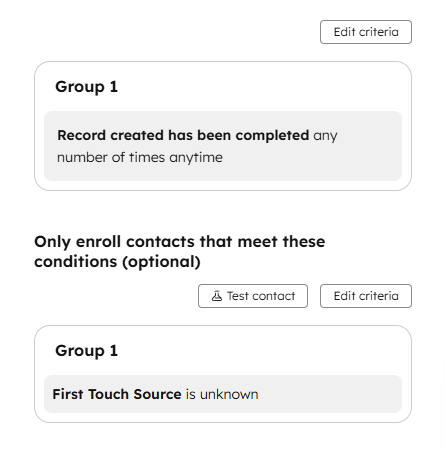
Workflow A: First Touch Stamping
- Trigger: Contact Creation, and only enroll contacts that don’t have a value in First Touch Source.
Workflow B: Last Touch Stamping
- Trigger: Lead Creation when the Last Touch Source is unknown with conditional options, if applicable.
- Logic: Copy the latest traffic data and/or UTM parameters into the Last Touch properties.
Step 5: Lock Data on the Deal [HubSpot only]
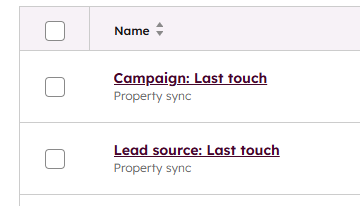
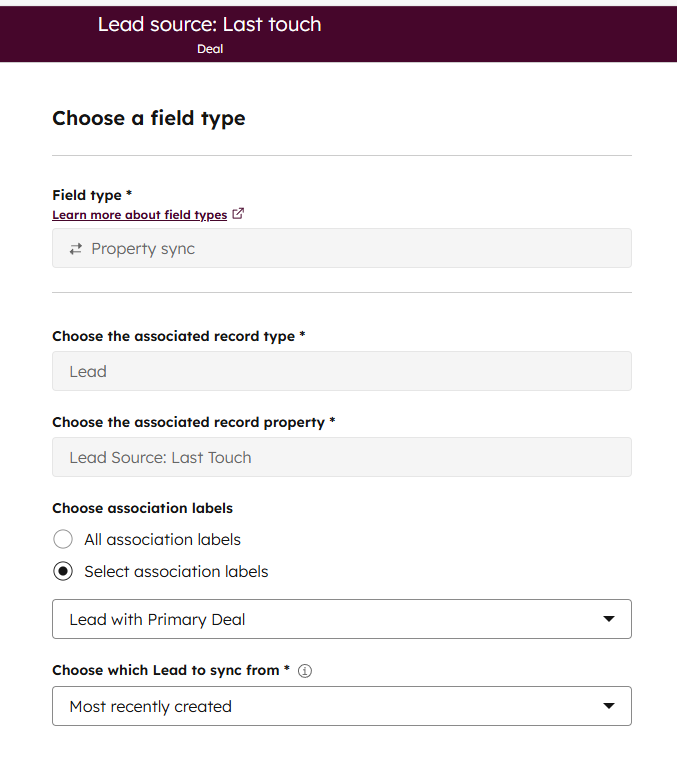
This is critical for ROI reporting. If you’re using a stage 0 opp, you can skip this step, since you’re dealing with the same object. In HubSpot there should always be a 1:1 relationship between a Lead and a Deal, so you need to create a Property Sync for each Last Touch field on the Deal object:
9. Possible Problems
Problem 1: Hidden Fields vs. URL Capture
Problem: Hard-coding UTM values into hidden fields on forms (e.g., hidden field "UTM Source" = "LinkedIn") is brittle. If a user clicks an ad, browses the site, and then fills out a generic "Contact Us" form, a hard-coded form will send the wrong data. Solution: Do not hard code values in hidden fields; leave the "default value" blank. For the full walkthrough of wiring these fields up correctly the first time, see how to pass UTM parameters into a HubSpot form using hidden fields. Allow HubSpot to natively capture the UTM parameter from the URL into the hidden field, or rely on the backend "Original Source" mapping workflow described in Step 4.
Problem 2: Offline Sources "Gray Area"
Problem: Contacts created via imports, Salesforce sync, or extensions often fall into a generic "Offline Sources" bucket, making it look like attribution is failing. Solution: Use the "Stamping Workflow" to differentiate. Use "Original Source Drill-Down 1" or "Drill-Down 2" to identify the import name or integration ID, then categorize it correctly (e.g., If Import Name contains "Trade Show" -> Set Source to "Event").
Problem 3: Meeting Links as Direct Traffic
Problem: HubSpot Meeting links often categorize contacts as "Direct Traffic" if not configured correctly. Solution: Be aware of this limitation. Encourage sales to use tracking parameters on their meeting links where possible, or use workflow logic to infer source if the conversion point was a meeting link.
10. Summary
Recurring or follow-up tasks generated:
- Monthly Audit: Review contacts with "Unknown" or generic "Other" sources to refine the mapping logic.
- Backfill First Touch: Run the workflow on existing contacts to populate historical data. Backfilling Last Touch
What projects does this unlock?
- ROI Reporting: Full-funnel attribution reporting.
- Budget Optimization: Reallocating spend to high-performing channels.