What is a CRM audit, and does your company need one?
A CRM audit shows whether you can trust the data in HubSpot or Salesforce, and what to fix first.


Can you say whether your pipeline report is right, or what half the fields in your CRM are for? If not, a CRM audit is how you find out. It's a review of your HubSpot or Salesforce setup against the way your teams actually work, and it shows whether you can trust the data and what to fix first.
This article is for you if you just inherited a CRM, whether you're the new sales or marketing leader or the person who keeps the system running day to day. It's based on the audits we run for clients in HubSpot, in Salesforce, and in companies running both. You'll learn what an audit covers, how to run one, what you should have at the end, and the problems we find most often.
Every audit we run follows the same four steps:
- Set the objective.
- Audit your processes.
- Review the system.
- Take your findings back to the team.
If you want a step-by-step CRM audit checklist, go straight to our HubSpot audit checklist or our Salesforce audit checklist.
What does a CRM audit cover?
A full audit looks at six areas. The weight of each one depends on how you use your CRM. If marketing runs out of HubSpot, the marketing review is a big part of the work. In Salesforce, configuration and custom code usually take more time.
Who needs a CRM audit?
You'll get the most out of one in two situations.
The first is when you're a new sales or marketing leader, like a VP of Sales who just inherited Salesforce. You usually have to show results in your first few months, and an audit gives you a clear picture of the system before you commit budget or promise numbers to anyone. Our guide to auditing an inherited CRM in your first 90 days lays out the timeline.
If your company is backed by private equity, the stakes are higher. Your investors expect pipeline and forecast numbers the board can trust, and buyers in a sale ask for figures like win rate, lead-to-deal conversion and renewals. If you can't produce them reliably from your CRM, the company sells for less. It works like selling a used car: the one with every service record gets a better price than the one with a mystery history.
The second is when you run the system day to day, like a RevOps manager. For you, an audit works best as a habit. Running the core checks every quarter catches problems while they're still small, and it gives you a ranked list to work from, so the next quarter goes to fixing what matters instead of answering tickets.
How do you run a CRM audit?
When we run an audit, the system review in step 3 takes us a day or two, a little longer for a complex Salesforce org. The whole audit, including the conversations with your team, usually takes one to three weeks, and most of that time goes to getting the right people together to answer questions. If it's your first audit, plan for the longer end.
Step 1: Set the objective
Before you open the CRM, decide what question the audit has to answer. Without one, you'll still get a readout of the system, but it won't tell you what to fix first.
Start by asking the people who use the CRM every day (sales reps, account managers and marketing) where it gets in their way, then turn each complaint into something you can check. If reps say the deal record has too many fields, for example, plan to go through every field to see which ones get used and which can be removed or simplified.
Step 2: Audit your processes
Understand how your teams are supposed to work before you look at the system. You can only judge a CRM against the process it's meant to support.
List each pipeline's stages and the entry and exit criteria your team agreed on, and write down what counts as a lead and what counts as a contact. Note which rules the CRM enforces and which exist only on paper. The best setup mirrors the agreed process and has guardrails that keep everyone following it.
Skipping this step leads to wrong conclusions. You might find thousands of old records on the lead object and flag it as a big problem, when the team stopped using leads years ago and the real question is whether to clean them up at all.
Step 3: Review the system
First, get full admin access in each system. Access is the issue I run into most often at the start of an audit, and without it, several settings and tools won't show up. Then go through each area in the table above.
Treat the whole audit as read only. Write down what you find, and change nothing until you've walked your team through the findings, because one change can set off workflows, automation or a sync you haven't reviewed yet.
How you check the data depends on the platform. In HubSpot, most checks are manual: you filter records in each object to find, say, open deals with no activity in 60 days. Salesforce lets you run queries (SOQL) in the Developer Console or a browser extension such as Salesforce Inspector Reloaded, so the same check takes one query. Inspector Reloaded is an open-source community tool that Salesforce doesn't make, so check your company's policy before you install it. Salesforce's flexibility is also why it takes more upkeep. It puts far fewer limits on how you customize it than HubSpot does, and complexity is easy to create and expensive to maintain.
Don't rely on queries and filters alone. Walk the store: open the records the way a rep or marketer does every day, and look at the page layouts and views each team uses. A record page crowded with unused custom fields is a finding too.
Our HubSpot audit checklist and Salesforce audit checklist walk through every item in order, and the Salesforce one includes the queries to run. If you run HubSpot and Salesforce together, give the sync its own section: our guide to the HubSpot and Salesforce integration explains how it should be set up.
Step 4: Take your findings back to the team
Bring your findings and questions back to the people who use the system. The system shows you what's happening, but only your team can tell you why.
This is how you tell a technical problem from a process or adoption problem. Some patterns point clearly to process: if the system is full of custom objects and fields nobody uses, too many people can probably create them. Bad data on its own could be any of the three, though. Close dates that never get updated might mean the field is hard to find, reps don't see why it matters, or the field was never given an owner. Stay skeptical, and check your guess with the team before you decide on a fix.
What should you have at the end?
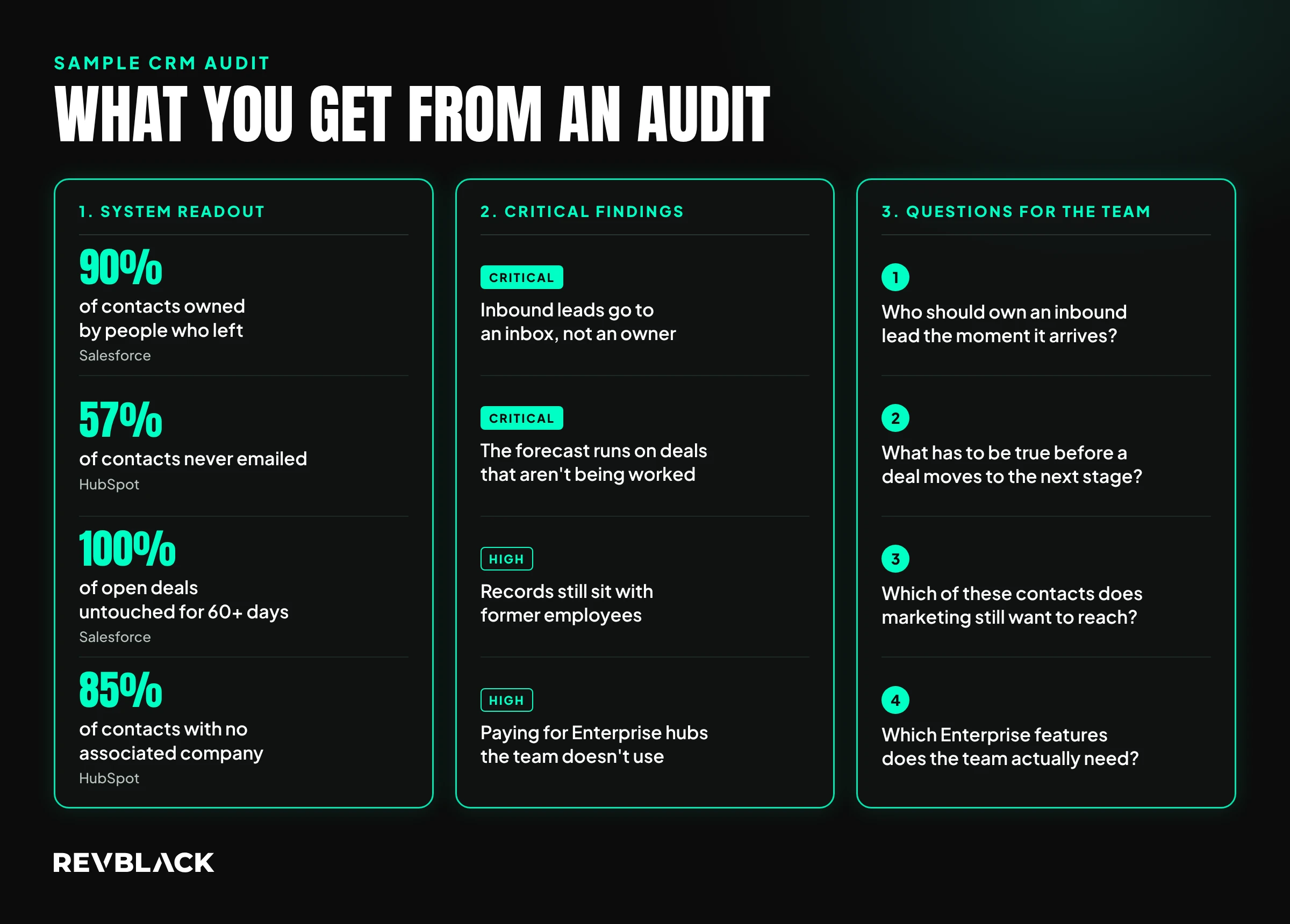
Three things:
- A readout of the system: the data quality numbers and what you found in each area.
- A short list of critical findings: the issues that need attention first, such as a high duplicate count or undocumented custom objects.
- A list of questions for your team, or for anyone who knows how the system got this way, like a teammate who's leaving soon.
Back each finding with evidence, such as screenshots, examples, short screen recordings or workflow details. That makes it easier to agree on what's wrong and build a plan to fix it.
Rank your critical findings by business impact. In our audits, pipeline problems usually come first, because if deals aren't kept up to date, your forecast is wrong and every report built on it is too. Duplicates and integrations that keep adding bad records come next, because they make every other fix harder to keep clean.
Before you call the audit done, check that:
- You understand every finding well enough to explain it to your team in your own words.
- Every pain point from step 1 has a finding or an explanation.
- Every critical finding has a question for your team and a rank.
Write down your main counts too, like open deals with no activity in 60 days or contacts owned by inactive users. They're your baseline. When you run the same checks next quarter, those numbers should go down. If one didn't, the fix didn't stick, and it goes on the next list.
What problems does a CRM audit usually find?
Every system is different, but the same problems come up again and again in our audits:
- Duplicate records, which make reports and outreach unreliable.
- A pipeline you can't trust: missing or zero amounts, close dates in the past, and open deals untouched for months. I've seen reps type 0 into a required amount field just to save the deal. When the pipeline is off, so is your forecast.
- Integrations creating records your team never asked for. A system can be set up well and still fill with bad data if no one keeps an eye on what connected tools send into it.
- A HubSpot and Salesforce sync that drops records. Sync errors can lose inbound leads quietly, so sales never follows up.
- A CRM that's hard for your sales team to use. When updating it feels like extra work on top of selling, deal details stay in reps' heads and never reach your reports.
- Workflows that were built for a short-term need and never turned off.
- Too many system admins. When 10 people on a 15-person team are admins, fields, layouts and objects change without anyone documenting why.
- No clear definition of a lead versus a contact in Salesforce. That causes real trouble when Salesforce syncs with HubSpot, because the two systems use the words differently. We recommend retiring the Lead object and tracking early interest as a pre-pipeline opportunity, and our guide to leads and contacts in Salesforce explains why.
For duplicates specifically, our CRM deduplication playbook covers how to clean them up.
Can AI run a CRM audit for you?
AI can do a lot of the checking, but it can't run the audit on its own. If you connect an AI tool to HubSpot or Salesforce, it can handle most of the checks on your setup (fields, objects, automations) and your data quality, especially when you give it a checklist and the queries to run.
Asking it to "audit my CRM" with no context about your business gives you a long readout that's hard to act on. The audit works when you know the business model, set the objective, and understand every finding. AI also can't fill in data that was never entered. Use it to speed up the checking, and make the calls yourself.
Do you always need a full CRM audit?
If you already know the one problem you need to solve, you may not need to review everything. Keep the objective narrow and focus the audit on that area, such as the deal record or the sync. A full audit makes the most sense when you're new to the system, or when problems keep showing up in places you didn't expect.
Frequently asked questions
How often should I audit my CRM?
Run a full audit when you take over a system or before a big change. After that, a lighter quarterly review, sometimes called a CRM health check, keeps problems small. A data quality dashboard helps between audits, tracking things like deals with past close dates so you can follow up before they pile up.
What access do I need to run a CRM audit?
System admin access, ideally in every system you're reviewing. In HubSpot that means Super Admin, or a partner seat if a HubSpot partner runs the audit for you. In Salesforce it means System Administrator. Without full access, parts of the system won't show up and your audit will have gaps.
Is a CRM audit the same as Salesforce Health Check?
No. Health Check is a tool built into Salesforce Setup that scores your security settings against a Salesforce baseline. It's a useful part of an audit, and our Salesforce checklist includes it, but it doesn't look at your data or how your team uses the system.
Can someone run a CRM audit for me?
Yes. RevBlack follows the same four steps from this article. Once we have access to your systems, the system review takes us a day or two, and within one to three weeks you get the readout, the critical findings and the questions for your team, like the sample above. You also see the roadmap for fixing them and meet the people who'd do the work, all before you sign anything.