What is Clay, and how does it help you generate pipeline?
Clay catches event triggers, like a new VP of Sales or a funding round, and puts them in your CRM so your reps know who to call and when.


Think about the last few customers you signed. Most of them didn't show up out of nowhere. Something changed at their company first. Maybe they hired a new VP of Sales, raised money, bought another company, or started hiring salespeople. That change is what got them ready to talk to you.
We call those changes event triggers. Most of them are public, so you can find them on LinkedIn, in the news, or on a company's careers page. The hard part is catching them in time. Someone on your team might see a funding announcement on LinkedIn, but if it never makes it into your CRM, nobody follows up, and that account keeps getting the same emails as everyone else.
That's where Clay comes in. Clay is a data enrichment and automation platform. In simple terms, it finds information about the companies and people you sell to and adds it to HubSpot or Salesforce for you. Some of that is basic, like company size and the software they use. The important part is the event triggers. When something changes at one of your accounts, Clay updates the record, and your rep hears about it that week.
So how does Clay help you generate pipeline? It does three jobs, and each one gets its own section below:
- Find the right accounts: it builds your list of target companies and fills in the details, so your reps spend their time on companies that fit.
- Know when and who: it watches for event triggers and tells your rep who to contact while the timing still matters.
- Reach them automatically: it writes outreach based on what it found and sends it through Clay's own email tool or the one your team already uses.

Where does Clay sit in your stack?
Most teams already pay for a contact database like Apollo or ZoomInfo. Clay can use that as one of its sources, alongside many others. When you ask Clay for a piece of information, like a company's headcount or a person's email, it checks several data providers one after another until one of them has the answer. That matters when the companies you sell to aren't well covered by the big databases.
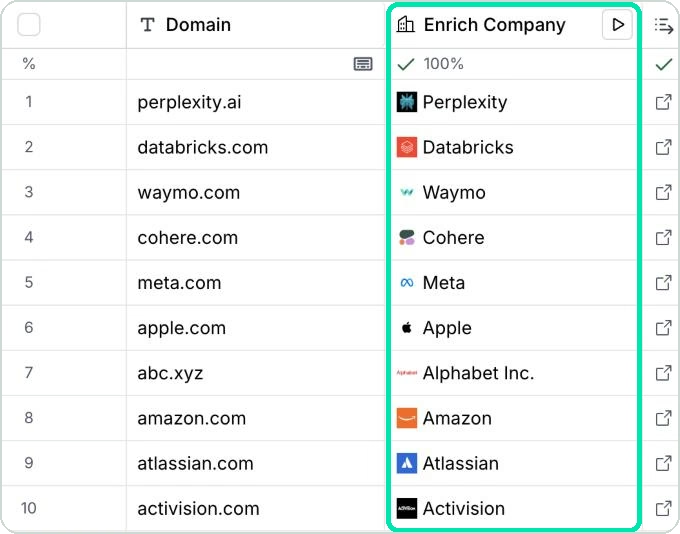
Clay works like a spreadsheet. Each row is a company or a person, and each column is a piece of information Clay fills in. Here's the simplest example. A list of company website addresses goes in, and Clay matches each one to the company name and its LinkedIn page.
Some information isn't in any database. Maybe you need to know whether a company offers a certain service, or which software a job post asks for. For that, Clay has an AI agent called Claygent. It goes to the company's website or the job post, reads it, and pulls out the answer for you. Clay's guide to AI in Clay describes it as a way to "build repeatable AI agents for web research and prospecting that can navigate websites, extract information, and make decisions."
Between the data providers and Claygent, Clay can find almost anything public about a company. Here's how it puts that to work on the three jobs.
Job one: find the right accounts
Job one starts with your ideal customer, the type of company that's the best fit for what you sell. Clay builds a list of companies that match it and fills in details like the software they use, how many people they employ, how much money they've raised, and where their key people worked before. Each detail goes into the CRM field you choose.
On top of the basics, these are the three things we build most often:
- Custom industries: for when the standard industry dropdown in your CRM doesn't describe your market.
- Segments: groups of accounts based on what actually makes a good customer for you, rather than only industry and company size.
- Lookalikes: new companies that look like the customers you already have.
Clay works best when you know exactly who you sell to. "Mid-size companies in healthcare" is too broad. "Outpatient clinic groups with five or more locations" is specific, and there's a lot of public information about companies like that, so Clay can build you a tight, accurate list. The broader your target, the less Clay has to go on, and the list comes back messier.
Once your list is built, Clay can keep it up to date. If a company grows, switches software or brings in a new leader, Clay refreshes that information automatically. What it won't do is add new companies to the list on its own. When you want more accounts, someone on your team runs a new search, and Clay fills in the details for those too.
So now you have a good list, and you know who to call. What the list doesn't tell you is when to call them. That's where event triggers come in.
Job two: know when to reach out, and to whom
This is the part that creates pipeline, because timing matters. If a company raised money three months ago, a "congrats on the funding" email is old news by the time it lands.
Inside Clay, event triggers are called signals, and Clay's signals documentation defines them as "automated tracking systems that notify you of important changes related to your contacts and target companies." Clay can watch for new hires, promotions, people changing jobs, job postings, news and funding, visits to your website, people posting about topics related to what you sell, and custom signals you set up yourself.
Every signal follows the same four steps. Something happens at the account, Clay spots it, the CRM record gets filled in, and your rep acts on it.

That's a lot of signals, and turning all of them on just creates noise. So when we work with a client, we sort them into five groups and pick the ones that matter for their business. The groups are ours, and the signals in the right column are Clay's.
Say you sell scheduling software to outpatient clinics. Here's what each group could look like:
- Timing: the operations director who starts at a twelve-location group in January, before anyone there has picked a vendor.
- Relationship: the practice manager who bought from you in 2024 and has just moved to a bigger group.
- Growth: the group that acquired four clinics last quarter and now runs four different front desks.
- Interest: the manager who came back to your pricing page twice in a week.
- Events: the attendee list from the regional practice management conference.
The five groups stay the same for every business, but what goes in each one changes completely. That's why choosing them is the first real conversation we have.
One signal is worth a closer look: web intent. Clay's web intent documentation says it tracks visitors to your own site, "including pages visited, time spent, and traffic sources." In plain terms, you can see which companies are reading your pricing page. A company that comes back to that page twice in a week is usually much closer to buying than anyone on a cold list.
The Events group works a little differently. Clay doesn't have a built-in conference signal, so you upload the attendee or exhibitor list, and Clay fills in the details like it would for any other list.
For any of this to work, each signal has to land in your CRM, in a field your reps actually check. Setting that up is the part we do for clients. A signal that lands somewhere nobody looks won't turn into a conversation.
Once a rep knows who to call and when, the last piece is what to say.
Job three: reach them automatically
Without Clay, figuring out what to say means research by hand. A rep opens the company site, checks LinkedIn, reads a press release, and writes one email. That works at 20 accounts a week and falls apart at 200.
Clay does that research for you, then writes the personal part of the email from what it found, like something on the company's website, a recent LinkedIn post, the software they use, or a news story. That's a lot more personal than dropping in someone's first name.
Here's what that changes in the inbox. A weak opener runs "Congrats on the Series B, thought I'd reach out about your RevOps." A stronger one runs "You raised a Series B in October and have posted three sales rep roles since, so I'm guessing lead routing is next on your list." Both take a rep the same amount of time. The second one shows the reader you looked.
Once the emails are written, you can send them from Clay's own email tool, called the sequencer, or from the tool your team already uses, like Apollo, Outreach, HubSpot or Salesforce.
The same setup works for accounts you've already talked to. A prospect who went quiet in June might have hired a new VP and raised money since then. Clay catches that, and your rep has a real reason to reach back out.
We also build a LinkedIn post check into the personalization step, so a rep knows whether the person has written about the problem recently. It matches on meaning instead of keywords, so a post about reps living in spreadsheets counts as a post about manual work. When nothing matches, it returns no match rather than forcing one, and the rep starts the email with something else.
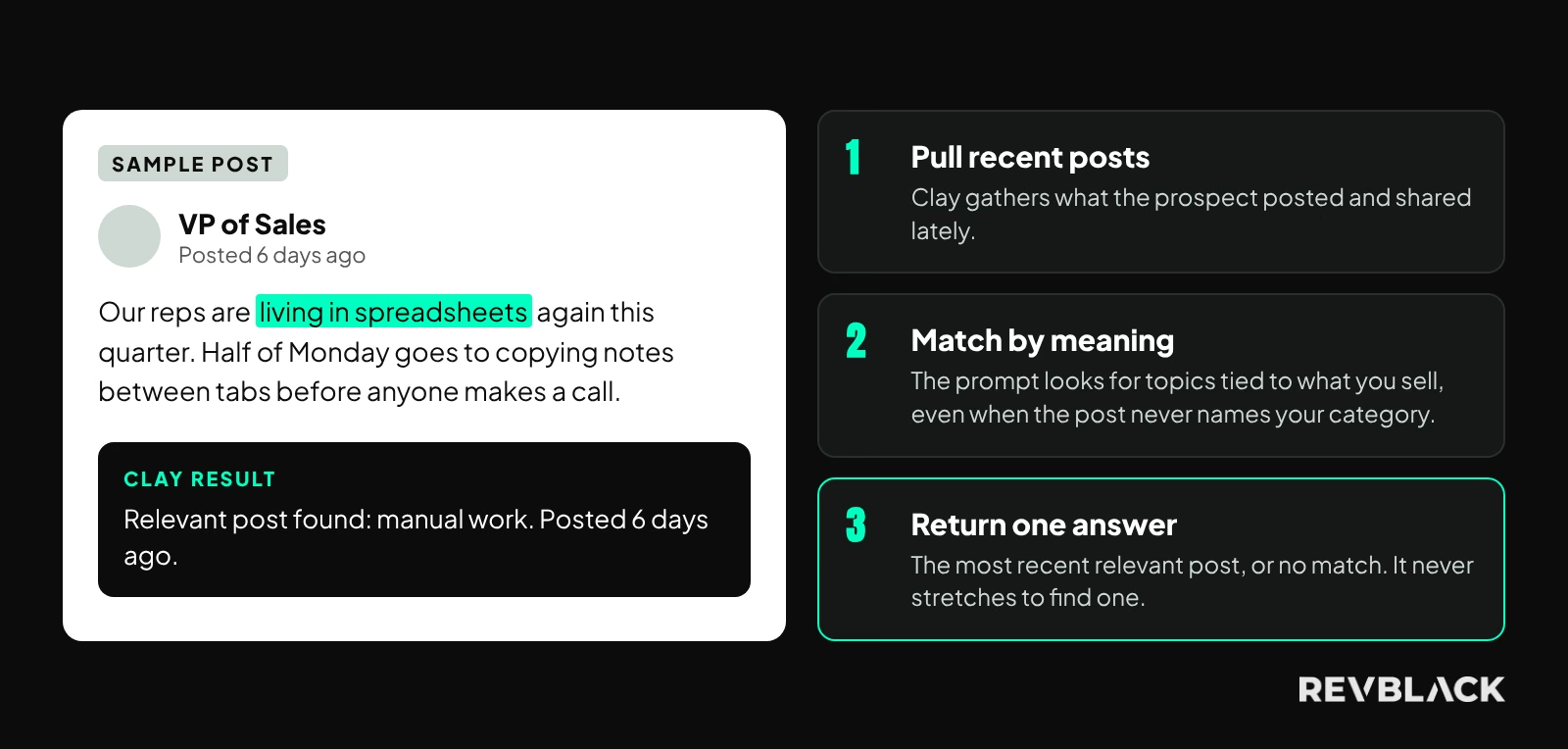
All three jobs end in your CRM, and that's where most Clay projects get stuck.
What does Clay fix, and what does it leave to you?
The first thing most teams notice is a more complete CRM. Clay fills in blank fields and fixes information that's gone out of date, like a contact who changed jobs.
Clay also has an auto-dedupe feature that stops the same company from showing up twice in a Clay table, so you don't pay to look it up twice. That only works inside Clay, though. Duplicates already sitting in your CRM need to be cleaned up separately.
Here's how the work splits between Clay and your team.

What Clay can't do is make decisions about how your CRM works, like who owns each account or what each stage of your sales process means. Clay puts information in the field you tell it to. If nobody has agreed on who gets notified when that field changes, the signal shows up and nothing happens. You've paid for the data, and it never turns into a conversation.
Most Clay projects also need new fields in your CRM, and reports that use them. And if leadership doesn't trust the CRM today, adding more data to it won't change that. Our HubSpot audit checklist is the quick way to see what's in the way, and CRM data quality covers why the gaps show up in your pipeline numbers.
That's why we start every Clay project with a few questions.
What should you answer before you start?
These come from our Clay Data Workshop, which we run before anything gets built. You can answer most of them yourself in an hour, and the answers decide what the first build looks like.
- Who exactly is your ideal customer, and which signals matter most for it?
- What data do you want, and where should it come from? Websites, news, social, the software they use, job postings.
- Do you need new CRM fields to hold any of it?
- How will reps use the data once it's there?
- Which tool will send your emails?
- Should Clay only send data into your CRM, or should changes in the CRM flow back to Clay too?
- Do you want Clay working on companies, people, or both?
- Any compliance limits? Government, healthcare and finance usually have them.
If the first question is the hard one, start there. Clay performs best when you know exactly who you're targeting, and an undefined ideal customer is one of the most common reasons a build stalls halfway.
How do we set up Clay for a go-to-market (GTM) team?
The work runs in six phases:
- Strategy and alignment: the Clay Data Workshop, where we agree on the ideal customer, the signals, the data you need, and where each piece lands in the CRM.
- Infrastructure: we connect your CRM and the data providers, build the first company and contact tables, and add any fields you need.
- Prompts: we write and test the instructions Clay's AI follows when it does research.
- Sync and validation: we send the data into your CRM, check that each piece lands in the right field, and watch the results.
- Personalization and outbound: we connect the personalized messages to your email campaigns and train the reps.
- Iteration: we add more signals, improve the prompts and build new tables as you need them.
A few parts take longer than teams expect. Prompts usually need 3 to 8 rounds of changes per table, sometimes more. First results are often messy, and they get better once a prompt is split into smaller pieces and given examples of what a good answer looks like. Reps need training before any of it gets used, because a new column doesn't explain itself.
Clay can do a lot, and scope creep, adding more and more to the project before the first part is working, is the most common problem on these projects. Complexity is easy to create and expensive to maintain, so we cap the first build at the tables you'll actually report on and add from there. For the clinic scheduling vendor above, that's one company table, one contact table, two signals turned on, and three new CRM fields. Everything else waits for the second build.
We've run more than 300 CRM audits, so the part we're quickest at is the mapping, deciding which field each piece of data lands in and which reports use it afterwards. If you'd rather have that help on retainer than hire for it, fractional RevOps covers how we staff it.
What should you measure?
Write these numbers down before the first table gets built, or you won't be able to tell what Clay changed:
- Lead volume
- Pipeline created
- Open and reply rates
- Meetings booked
- Sales cycle length
- How complete your CRM data is
- How much time reps spend researching accounts
We're not going to promise you a number. The results move too much with the ideal customer and the signals you pick, and the only figures worth quoting are the ones from your own before and after.
When does Clay pay off fastest?
Clay pays off quickest when at least one of these is true:
- Personalization: you need outreach that's more personal than a first name.
- Targeting: you know exactly who your ideal customer is.
- Data gaps: your current tools don't have the data you need.
- Repeatability: you want a cold outreach process you can run again and again.
If one of those is missing, it usually becomes the first piece of work on the project.
Go back to the clinic scheduling vendor. If they have a tight account list and a rough idea of which events matter, they're in good shape, because picking the right events is something we can work out together in one workshop. If the same vendor sells to everyone in healthcare, they have a targeting problem to solve first.
The first real decision is which events would tell you an account is ready to talk. Get that list right and the rest of the build is straightforward. Get it wrong and you've automated outreach to accounts that were never close to a decision.
Frequently asked questions
How much does Clay cost?
Clay has a free plan and paid plans that scale with how much data and AI research you run. The plan most teams need is the one that lets Clay connect to your CRM, because that's what gets signals into HubSpot or Salesforce. As of November 2026, that's the Growth plan and up. Check Clay's pricing page for current numbers, and budget for usage on top of the plan, since lookups and AI research use credits.
Does Clay replace Apollo or ZoomInfo?
No. Those are contact databases. Clay is enrichment and automation software that uses a database like that as one source among many, so most teams keep the one they already pay for and use Clay to fill in what that database doesn't have for their ideal customer. If your reps are happy with their contact data and the gap is knowing when to call, replacing the database won't help.
What compliance considerations apply?
If you sell to regulated industries, there are usually limits on what public data you can store about a person and how you're allowed to contact them. We ask about it before the first table gets built, because the answer changes which data sources we can use and which fields are safe to write back into the CRM.
How long does setup take?
Buying Clay and connecting it to your CRM takes minutes. Everything after that depends on writing and testing prompts, setting up your CRM fields and training your reps, so the honest answer depends on how many tables and signals you start with and how clear your ideal customer already is. We size that with you in the first conversation, so you get a timeline for your build instead of an average that won't match it.
Where should you start?
The quickest way to find your event triggers is to start from the deals you've already won. Bring a few to a call, and we'll show you which events came before each one and which are worth turning on first.